








Projects

“In an increasingly complex business landscape, I have built my experience by supporting organisational change, process optimisation, and technology transformation initiatives across a range of projects. Below is a collection of selected case studies, past projects, and written business analysis documents that reflect the practical work I have delivered throughout my professional experience.

Through stakeholder collaboration, detailed requirements analysis, and structured process evaluation, I have worked to turn complex business problems into clear understanding, well-defined requirements, and practical solutions. The projects and materials presented here demonstrate how my analysis has contributed to successful outcomes across different initiatives and delivery environments.”

Regulatory Documentation & Data Quality Improvement
Client Data Consolidation & Validation
Compliance Data Reporting & Process Improvement Initiative
Cleaning Data in Excel — Data Cleaning & Transformation
Import PDFs into Excel with Power Query
Patient Heart Attack Risk Alerts Query (Requested By Client During Clinical Trial)
Customer Churn Analysis SQL
Oil & Gas Project (SQL)
Waterfall vs. Agile (Business Analytics)
Service Level Requirement Agreement (SLRA)
Data Management Plan (DMP)
Vendor Proposal (VP)
Data Migration
Regulatory Affairs Impact Assessment (RAIA)
Organisational Process Qualification (OPQ)
SWOT/Pestle Analysis
Risk and Issue Logs (BA perspective)
Meeting Notes and Workshop Summaries
Project Charter
Training and User Documentation
Test Plans and Test Cases
Solution Assessment Document
Change Request Documentation
System Requirements Specification (SRS)
Interface Requirements Document
Data Requirements / Data Dictionary
Requirements Traceability Matrix (RTM)
Gap Analysis Document
Process Flow Diagrams / Workflow Diagrams
Use Case Specifications
Non-Functional Requirements Document (NFR)
Functional Requirements Document (FRD)
Stakeholder Analysis
Business Requirements Document (BRD)

Innovation – Collaboration

Data Analytics

Client Data Consolidation And Validation Project

Client Data Consolidation & Validation Project

Multi-Source Operational & Regulatory Data Consolidation Initiative

Client: Confidential Healthcare & Pharmaceutical Services Organization
Role: Business & Data Analyst — SB Pharma Ltd
Project Duration: 5 Months
Industry: Pharmaceutical / Healthcare Operations


Project Overview

SB Pharma Ltd was contracted by a healthcare and pharmaceutical services client to support a large-scale data consolidation and validation initiative after the organization experienced ongoing reporting inconsistencies, fragmented datasets, and operational inefficiencies caused by disconnected reporting systems.

The client managed operational, compliance-related, and client reporting information across multiple departments using:

  • Excel spreadsheets

  • CSV exports

  • PDF reports

  • Email attachments

  • Shared drives

  • Legacy tracking files

  • Departmental databases

Because each department maintained its own reporting structure and data standards, the organization experienced:

  • Duplicate datasets

  • Inconsistent reporting outputs

  • Conflicting information across systems

  • Missing and incomplete records

  • Unstructured data formats

  • Delays in validation and reporting cycles

  • Time-consuming manual reconciliation activities

The objective of the project was to consolidate multiple data sources into structured master datasets, improve data consistency, validate critical reporting fields, and create standardized reporting processes that would improve operational visibility and reporting reliability.


My Responsibilities

  • Consolidate data from multiple reporting sources

  • Perform large-scale data cleansing and validation

  • Extract information from PDF and exported reports

  • Standardize datasets and reporting formats

  • Identify duplicate and incomplete records

  • Coordinate with stakeholders to validate information

  • Develop structured reporting templates and dashboards

  • Improve reporting workflows and data governance practices


Initial Data Environment

Data Sources Used During The Project

The client’s data environment was highly fragmented.

Primary Data Sources

SourceFormatDescription
Department ReportsXLSX / CSVOperational and tracking reports
Legacy Tracking FilesXLSHistorical reporting logs
Shared DrivesPDF / ExcelCompliance and operational documents
Email AttachmentsPDF / CSVUpdated reports from departments
Internal DatabasesExported CSVTransaction and operational data
Client Reporting FilesXLSXMonthly reporting submissions

Example Of Raw Data Problems

Example 1 — Different Column Structures

Department A Export

Product_IDProduct_NameRegion
PRD001Product AUK

Department B Export

ProductCodeNameMarket
PRD001PRODUCT AUnited Kingdom

Problems Identified

  • Different column naming conventions

  • Inconsistent product naming

  • Different country formats

  • Difficult to merge datasets accurately


Example 2 — Missing Data

Product_IDProduct_NameOwnerApproval_Date
PRD100Product XNULL12/02/2024
PRD101NULLOperationsNULL

Problems Identified

  • Missing ownership information

  • Incomplete reporting fields

  • Reduced reporting accuracy


Example 3 — Duplicate Reporting Records

Product_IDVersionStatus
PRD201v1Approved
PRD201v1Approved
PRD201v2Draft

Problems Identified

  • Duplicate approved records

  • Multiple versions stored across departments

  • Confusion regarding latest approved records


Step-by-Step Breakdown

STEP 1 — Data Collection & Import Process

The first stage involved collecting all reporting files and consolidating them into a controlled working environment.


Files Received From Client

The client supplied:

  • Excel spreadsheets (.xlsx)

  • CSV exports from operational systems

  • Legacy XLS files

  • PDF reports

  • Shared drive folder exports

  • Email reporting attachments


Importing Data Into Excel & Power Query

Method Used

Data was imported using:

Excel → Data Tab → Get Data

Import sources included:

  • From Workbook

  • From CSV

  • From Folder

  • From Text


Example CSV File

Product_ID,Product_Name,Status,Region
PRD001,Product A,Approved,UK
PRD002,PRODUCT A,Draft,United Kingdom

Power Query Consolidation Workflow

Power Query was used to automate the consolidation of multiple files.

Workflow

Get Data → From Folder
↓
Combine Files
↓
Standardize Column Names
↓
Remove Blank Rows
↓
Transform Data Types
↓
Load Into Master Dataset

Data Standardization Activities

The following standardization activities were performed:

ProblemSolution
Different column namesStandardized headers
Mixed date formatsConverted to YYYY-MM-DD
Inconsistent regionsStandardized region values
Blank rowsRemoved
Duplicate columnsConsolidated

STEP 2 — Data Cleansing & Validation

Once the datasets were imported, the next phase focused on improving data quality.


Duplicate Detection Process

Excel Methods Used

  • Conditional Formatting

  • COUNTIF()

  • Remove Duplicates Tool

Example Formula

=COUNTIF(A:A,A2)>1

This highlighted duplicate Product IDs.


SQL Validation Queries

SQL queries were used to identify duplicate and incomplete records.

Example Duplicate Query

SELECT Product_ID, COUNT(*)
FROM Client_Records
GROUP BY Product_ID
HAVING COUNT(*) > 1;

Standardizing Product Names

Before

Product Name
PRODUCT A
Prod-A
ProductA

After

Product Name
Product A

Handling Missing Information

Validation trackers were created to monitor unresolved records.

Example Validation Tracker

Product IDMissing FieldAssigned TeamStatus
PRD100OwnerOperationsPending
PRD101Approval DateComplianceClosed

STEP 3 — PDF Data Extraction

Several operational reports were only available as PDFs.


Types Of PDFs Processed

  • Monthly operational reports

  • Compliance summaries

  • Validation logs

  • Client reporting packs


Extraction Process

Manual Extraction

For smaller reports:

  • Opened PDFs

  • Copied structured tables into Excel

  • Standardized formatting


Python Data Structuring Process

Python and Pandas were used to structure exported datasets.

Example Workflow

import pandas as pd

file = pd.read_csv('client_report.csv')
file.head()

Cleansing Activities Performed

  • Removed duplicate rows

  • Removed null values

  • Renamed columns

  • Converted date formats

  • Standardized text formatting

  • Reconciled conflicting values


STEP 4 — Data Consolidation & Master Dataset Creation

Once cleansed, the datasets were consolidated into centralized reporting tables.


Example Consolidation Workflow

Import Files
↓
Clean & Standardize Data
↓
Merge Datasets
↓
Validate Records
↓
Create Master Dataset
↓
Generate Reporting Tables

Example Master Dataset Structure

Product_IDProduct_NameRegionStatusOwner
PRD001Product AUKApprovedRegulatory
PRD002Product BGermanyDraftOperations

STEP 5 — Stakeholder Coordination & Validation

The project required continuous collaboration with multiple departments.


Teams Involved

  • Operations Team

  • Compliance Team

  • Commercial Team

  • External Client Contacts

  • Reporting Teams


Validation Workflow

Identify Data Issue
↓
Assign To Relevant Team
↓
Validate Information
↓
Update Master Dataset
↓
Close Validation Task

Example Follow-Up Tracker

Issue IDDescriptionAssigned TeamStatus
001Missing Region DataOperationsClosed
002Duplicate Product RecordCompliancePending

STEP 6 — Reporting & Dashboard Development

Once the master datasets were finalized, dashboards and reporting templates were created.


Dashboards Developed In Power BI

Dashboard Metrics Included

  • Duplicate Record Tracking

  • Missing Data Monitoring

  • Validation Progress

  • Regional Reporting Status

  • Reporting Completion Rates


Example Dashboard KPIs

KPIResult
Duplicate Records Removed1,500+
Files Consolidated4,000+
Missing Fields Resolved90%
Reporting Accuracy ImprovementSignificant Reduction In Errors

Final Outcomes

The project successfully improved the client’s operational reporting and data management processes.

Key Achievements

  • Consolidated fragmented datasets into centralized reporting structures

  • Improved data consistency and reporting accuracy

  • Reduced duplicate and incomplete records

  • Standardized reporting formats and naming conventions

  • Improved data visibility across departments

  • Reduced manual reconciliation effort

  • Enhanced reporting reliability and operational efficiency


Technologies Used

TechnologyPurpose
ExcelData cleansing, validation, reporting
Power QueryData import and transformation
SQLData validation and reconciliation
Power BIDashboard reporting and KPI monitoring
Python (Pandas)Data structuring and cleansing

Skills Demonstrated

  • Data Consolidation & Structuring

  • Data Cleansing & Validation

  • Reporting Standardization

  • Data Reconciliation

  • Stakeholder Coordination

  • Process Improvement

  • Dashboard Development

  • Data Governance Support

  • Operational Reporting

  • Data Quality Management


Portfolio Summary

This project demonstrates my ability to consolidate and structure large volumes of fragmented operational and compliance-related data from multiple sources while improving reporting quality, validation processes, and stakeholder collaboration.

The experience strengthened my ability to:

  • Work with complex multi-source datasets

  • Improve data consistency and governance

  • Manage validation workflows

  • Build structured reporting environments

  • Support operational and compliance-focused reporting

  • Coordinate effectively with cross-functional stakeholders

It also demonstrates practical experience handling real-world data quality and reporting challenges within regulated and fast-paced business environments.

Innovation – Collaboration

Data Analytics

Compliance Data Reporting & Process Improvement Initiative

Compliance Data Reporting & Process Improvement Initiative

Operational Reporting Standardization & Data Governance Project

Client: Confidential Pharmaceutical & Healthcare Services Organization
Role: Business & Data Analyst — SB Pharma Ltd
Project Duration: 6 Months
Industry: Pharmaceutical / Healthcare Operations


Project Overview

SB Pharma Ltd was engaged by a pharmaceutical and healthcare services client to support a compliance reporting and process improvement initiative after the organization identified ongoing reporting inefficiencies, inconsistent operational data, and poor reporting visibility across multiple departments.

The client relied heavily on manual reporting processes using:

  • Excel spreadsheets

  • Shared drives

  • CSV exports

  • Email reporting chains

  • Legacy tracking files

  • Operational databases

  • Compliance monitoring reports

Because reporting activities were managed independently by different teams, the organization experienced:

  • Inconsistent reporting outputs

  • Duplicate and outdated records

  • Delays in monthly reporting cycles

  • Poor version control

  • Missing and incomplete data fields

  • Difficulties tracking compliance activities

  • Time-consuming manual reconciliation processes

  • Lack of standardized reporting structures

The objective of the project was to improve compliance-related reporting processes, standardize reporting structures, improve data quality, and create a more efficient and reliable reporting environment.


My Responsibilities

  • Analyse operational and compliance-related datasets

  • Consolidate data from multiple reporting systems

  • Identify reporting inconsistencies and data quality issues

  • Standardize reporting templates and data structures

  • Improve document organization and reporting workflows

  • Coordinate with stakeholders to validate reporting data

  • Build dashboards and reporting trackers

  • Support process improvement and data governance initiatives


Initial Reporting Environment

Existing Reporting Sources

The client maintained reporting information across multiple disconnected systems.

Primary Data Sources

SourceFormatDescription
Monthly Operational ReportsXLSX / CSVDepartment reporting data
Shared DrivesExcel / PDFCompliance documentation
Email AttachmentsCSV / XLSXUpdated reporting files
Legacy Tracking LogsXLSHistorical reporting records
Internal DatabasesCSV ExportsOperational system data
Compliance ReportsPDFMonthly compliance summaries

Example Reporting Problems

Example 1 — Inconsistent Reporting Formats

Team A Report

Product_IDCases_ClosedRegion
PRD00152UK

Team B Report

ProductCodeClosed_CasesCountry
PRD00152United Kingdom

Problems Identified

  • Different column names

  • Different region naming formats

  • Inconsistent report structures

  • Difficult consolidation process


Example 2 — Missing Reporting Data

Product_IDReporting_MonthStatusOwner
PRD020AprilClosedNULL
PRD021NULLOpenCompliance

Problems Identified

  • Missing reporting periods

  • Incomplete ownership information

  • Reduced reporting accuracy


Example 3 — Duplicate Reporting Entries

Product_IDReport_DateStatus
PRD30001/04/2024Closed

Problems Identified

  • Duplicate records inflated reporting totals

  • Manual reporting errors impacted dashboards


Step-by-Step Breakdown

STEP 1 — Data Collection & Reporting Audit

The first phase involved reviewing the client’s reporting environment and understanding how operational and compliance data was being managed.


Activities Performed

  • Collected reporting files from multiple departments

  • Reviewed folder structures and reporting workflows

  • Identified inconsistencies across reporting templates

  • Mapped data sources and reporting dependencies

  • Assessed reporting quality issues and duplication levels


Files Collected

The client supplied:

  • Excel workbooks (.xlsx)

  • CSV exports from operational systems

  • Legacy XLS tracking files

  • PDF compliance summaries

  • Shared drive reporting folders

  • Email reporting attachments


STEP 2 — Importing & Structuring Data

All reporting files were consolidated into a centralized working environment.


Excel & Power Query Import Process

Method Used

Excel → Data Tab → Get Data

Import sources included:

  • From Workbook

  • From CSV

  • From Folder

  • From Text


Example CSV Import File

Product_ID,Region,Status,Owner
PRD001,UK,Closed,Operations
PRD002,United Kingdom,Open,Compliance

Power Query Consolidation Workflow

Power Query was used to automate data consolidation.

Workflow

Get Data → From Folder
↓
Combine Files
↓
Transform Columns
↓
Remove Blank Rows
↓
Standardize Formats
↓
Load Into Reporting Dataset

Data Structuring Activities

ProblemSolution
Different column namesStandardized headers
Mixed date formatsStandardized dates
Duplicate fieldsConsolidated records
Blank rowsRemoved
Region inconsistenciesStandardized values

STEP 3 — Data Cleansing & Validation

After importing the data, cleansing and validation activities were performed.


Duplicate Detection Process

Excel Methods Used

  • Conditional Formatting

  • COUNTIF()

  • Remove Duplicates Tool

Example Formula

=COUNTIF(A:A,A2)>1

SQL Validation Queries

SQL queries were used to validate reporting datasets.

Example Query

SELECT Product_ID, COUNT(*)
FROM Compliance_Reports
GROUP BY Product_ID
HAVING COUNT(*) > 1;

Standardizing Reporting Values

Before

Region
UK
United Kingdom
U.K

After

Region
United Kingdom

Handling Missing Information

Validation logs were used to track incomplete reporting records.

Example Validation Tracker

Product_IDMissing FieldAssigned TeamStatus
PRD020OwnerOperationsPending
PRD021Reporting MonthComplianceClosed

STEP 4 — Reporting Workflow Improvement

The project focused heavily on improving reporting consistency and reducing manual effort.


Reporting Workflow Before Improvements

Manual File Collection
↓
Manual Data Copying
↓
Manual Validation
↓
Manual Reporting
↓
Email Distribution

Problems

  • High manual effort

  • Increased reporting errors

  • Slow reporting cycles

  • Difficult reconciliation process


Improved Reporting Workflow

Automated File Imports
↓
Standardized Templates
↓
Centralized Validation
↓
Structured Reporting Tables
↓
Dashboard Reporting

Improvements Introduced

  • Standardized reporting templates

  • Centralized reporting datasets

  • Validation procedures for incomplete records

  • Improved folder structures and naming conventions

  • Reduced manual consolidation activities


STEP 5 — Dashboard Development & KPI Tracking

Power BI dashboards were developed to improve visibility into reporting quality and operational performance.


Dashboards Created

Reports Included

  • Duplicate Reporting Records

  • Missing Data Tracking

  • Validation Completion Rates

  • Reporting Status Monitoring

  • Monthly Compliance Reporting Trends


Example KPI Dashboard Metrics

KPIResult
Duplicate Records Removed1,000+
Reports Standardized3,500+
Missing Fields Resolved88%
Reporting Cycle Time ReductionSignificant Improvement

STEP 6 — Stakeholder Coordination & Governance Support

Continuous collaboration with stakeholders was required throughout the project.


Teams Involved

  • Compliance Team

  • Operations Team

  • Reporting Team

  • Commercial Team

  • External Client Contacts


Validation Workflow

Identify Reporting Issue
↓
Assign To Relevant Team
↓
Validate Information
↓
Update Reporting Dataset
↓
Close Validation Task

Example Follow-Up Tracker

Issue IDDescriptionAssigned TeamStatus
001Duplicate Monthly ReportReporting TeamClosed
002Missing Region DataOperationsPending

Final Outcomes

The project successfully improved reporting quality, operational visibility, and compliance-related reporting processes.

Key Achievements

  • Improved reporting consistency across departments

  • Reduced duplicate and incomplete reporting records

  • Standardized reporting templates and structures

  • Improved reporting visibility and dashboard accuracy

  • Reduced manual reconciliation effort

  • Improved operational reporting efficiency

  • Enhanced data governance and reporting controls


Technologies Used

TechnologyPurpose
ExcelData cleansing, validation, reporting
Power QueryData import and transformation
SQLValidation and reconciliation queries
Power BIDashboard reporting and KPI monitoring
Python (Pandas)Data structuring and transformation

Skills Demonstrated

  • Compliance Reporting

  • Data Cleansing & Validation

  • Reporting Standardization

  • Dashboard Development

  • Stakeholder Coordination

  • Data Governance Support

  • Process Improvement

  • Data Consolidation

  • Data Quality Management

  • Reporting Workflow Optimization


Portfolio Summary

This project demonstrates my ability to improve compliance-related reporting processes by consolidating fragmented datasets, standardizing reporting structures, improving data quality, and supporting data governance initiatives within regulated environments.

The experience strengthened my ability to:

  • Work with large operational and reporting datasets

  • Improve reporting accuracy and consistency

  • Build structured reporting environments

  • Develop dashboards and KPI reporting tools

  • Coordinate with multiple stakeholders

  • Support process improvement and governance activities

It also reflects practical experience improving operational reporting efficiency and managing complex reporting workflows within fast-paced pharmaceutical and healthcare environments.

Innovation – Collaboration

Data Analytics

Cleaning Data in Excel — Data Cleaning & Transformation Project

Project Overview

This project demonstrates a complete end-to-end data cleaning workflow in Microsoft Excel using real-world data quality techniques commonly used by data analysts before importing data into SQL databases, Power BI dashboards, Tableau, or Python workflows.

The project was inspired by the practical Excel data cleaning techniques and focuses on preparing raw, inconsistent data into a structured, analysis-ready dataset.

The objective of the project was to:

  • Identify data quality issues
  • Standardize inconsistent formatting
  • Remove duplicate records
  • Clean text fields and spaces
  • Standardize dates and numeric formats
  • Improve reporting usability
  • Prepare the dataset for downstream reporting and analytics

Business Problem

Raw business datasets often contain inconsistent formatting, duplicate records, missing information, and unstructured text values that reduce reporting accuracy and create problems when importing data into systems such as:

  • SQL databases
  • Power BI
  • Tableau
  • Python workflows
  • Reporting dashboards

Without proper cleansing:

  • Reports become unreliable
  • Duplicate records inflate metrics
  • Date fields fail during imports
  • Text formatting breaks grouping logic
  • Additional spaces cause matching errors
  • Numerical fields import incorrectly

This project focused on resolving those issues using Excel-based cleaning techniques.


Dataset Used

The project used a modified U.S. Presidents dataset containing intentionally introduced data quality issues to simulate real-world messy business data.

Example Raw Dataset

President Party Vice President Net Worth Date
JAMES MONROE democratic-republican daniel d. tompkins $1,200,000 1/2/1820
james monroe democratic republican Daniel D. Tompkins $1,200,000 1820-01-02
Barack Obama Democrat Joe Biden $40,000,000 01-20-2009

Data Quality Issues Identified

Problems Found During Initial Review

Formatting Issues

  • Uppercase and lowercase inconsistencies
  • Mixed capitalization
  • Inconsistent naming conventions

Duplicate Records

  • Repeated rows
  • Duplicate entity records

Additional Spaces

  • Leading spaces
  • Trailing spaces
  • Multiple spaces between words

Spelling & Categorization Issues

  • Incorrect category labels
  • Inconsistent grouping values

Currency Formatting Problems

  • Currency symbols affecting numeric imports

Date Formatting Issues

  • Multiple date formats
  • Text-based dates
  • Inconsistent regional formatting

Unnecessary Columns

  • Redundant or irrelevant fields
  • Unstructured columns

Step-by-Step Data Cleaning Process

STEP 1 — Initial Dataset Review

The first step involved reviewing the dataset to identify obvious data quality problems.

Activities Performed

  • Scanned for inconsistent formatting
  • Reviewed text fields
  • Checked date columns
  • Identified duplicate records
  • Assessed unnecessary columns
  • Evaluated grouping fields for consistency

STEP 2 — Remove Duplicate Records

https://images.openai.com/static-rsc-4/RZK7SUC4MLwE4nwy6WwrpTzFoWLUtgAOJT9pJefwqN8Y8dirsv5Ft5TOW9vzGmTG-5slD3ejDQqV2EhHTq_7JHHYb-Kjpc55awby9GMLkBkC379zRoh-vwinWl_pH3JNvf_md4D4oFPCCzcyPlRJFR4O7WTeAeyEDYbjmjKmTff0fyTHwXXY9lvGWH_nCdPf?purpose=fullsize
https://images.openai.com/static-rsc-4/p1rMXwaD3jFSN4t22IDgnWszrIci14nRz7y-DOj_u6SaSMA87VEYW3ZHEIWcl6xhl0fXymH88ZexXiFGt0WNmBe5sdk1Wd55klJetFT_7E0z4t4fSuELoezN5OTtk5ftuKBXrm_RRbFlgP50cu-1SRFykFAltuUZoKMtG1pe8yTioKI6TvMOzn4HS1tcJe9i?purpose=fullsize
https://images.openai.com/static-rsc-4/n5XbiEqlBwtcjm95Cpe4HRdxYDKH0Qe_Xbvm_376CM-U28YNUIUJ0ww_XLLLa6RtiEg-OJjR-2RLh-Te4-wHFpvszTFqZHORsyI3R2t1tcvlbI5oD8Foro4Ji-FWbt8Yz-yuy_fHFvDyqA1d5q3mPS7hMcNbhw3b8nNDTwgDD4qodVejW4ajPpC_BJX3NY3B?purpose=fullsize
 
How to find and highlight duplicates in Excel
Excel: how to identify cells with different values in another column - Microsoft Q&A
Learn how to identify duplicate rows in your data | Sage Intelligence

Objective

Remove duplicate records that could distort reporting and analysis.


Excel Feature Used

 
Data Tab → Remove Duplicates
 

Excel automatically compared all selected columns and identified rows containing identical information.


Example Duplicate Record

Before Cleaning

President Party
Barack Obama Democrat

After Cleaning

President Party
Barack Obama Democrat

Why This Was Important

Duplicate records can:

  • Inflate KPIs
  • Distort calculations
  • Create inaccurate dashboards
  • Cause reporting inconsistencies

This step is especially important when working with datasets containing thousands of records.


STEP 3 — Standardize Text Formatting

Objective

Ensure all text values followed a consistent format.


Problem Example

Raw Values
JAMES MONROE
james monroe
James Monroe

Excel Functions Used

PROPER()

 
=PROPER(A2)
 

Converted text into standardized proper case formatting.


UPPER()

 
=UPPER(A2)
 

Converted text to uppercase when needed.


Example Result

Cleaned Value
James Monroe

Why This Was Important

Consistent formatting improves:

  • Filtering
  • Grouping
  • Pivot Tables
  • Dashboard accuracy
  • Data readability

STEP 4 — Fix Categorization Errors

https://images.openai.com/static-rsc-4/iDnZa3gYTuodhL9_iIbZn3YJu1se7s6Y-XOu0BYEq2-vlcTsxNfpEFx_nxSt5UMcdQd9FSV6LaHgeJ37HKmsUoMmTjhnBUoRwBXFiSSX73BNNt9zq_Fbn76jhEo-yJa_IiPZwf1YaYj2GS-v5ZnJ32CosnIAh5vgMbA0U3frIjMou1k6VF36f2rlLJssLwTh?purpose=fullsize
https://images.openai.com/static-rsc-4/x9EG9Er1BUiFNxL0PoVwH8fLOn-0UDNtAj8amSgRbfpqHF_UFsAWWjGCTIbTLwELG8egGjVs-kSCxjhWbQ6DIQZWPF1AlbPZkxKBzGwkOSBPVc3_i_W7vI_4mQNn7Ifi5MWAiFGz6843wGkV_Id5nr9mzy8EYFqzBkjnoaxoJBscwTAel3vk4z6ujiCJdYL5?purpose=fullsize
https://images.openai.com/static-rsc-4/_aYUBHxF6xB-791ZETY5Ux8gsxJSatCRmxZL2-e7jM4Hp7Keix_E5gMuPc-J7k73RghpB0IEP8vGxx0AL4Bp8P8nxck2jghYCefT5mJbKWf8FRQ9lZ0VOZVbfam5JPtONiQQDJPsC3OmaQf8tW7YjVzd5lptu_T7ejwGzdI_7PzpwsIqwbKD8OS20Fv5JuqP?purpose=fullsize
 
 How to spell check in Excel
Pivot table remove deleted items | Exceljet
 

Objective

Standardize category labels and correct inconsistencies.


Problems Identified

Raw Values
Republican
Republicans
democratic republican
democratic-republican

Method Used

Excel Filters

 
Data → Filter
 

Filters were used to identify inconsistent category values.


Corrections Made

Before After
Republicans Republican
democratic republican Democratic-Republican

Why This Was Important

Without standardization:

  • Pivot tables create duplicate categories
  • Reporting becomes inaccurate
  • Dashboards display fragmented groupings

STEP 5 — Remove Additional Spaces

Objective

Remove hidden spaces that could break filtering, matching, or SQL imports.


Problems Identified

Raw Values
John Smith
John Smith
John Smith

Extra spaces are often invisible but create major matching issues.


Excel Function Used

TRIM()

 
=TRIM(A2)
 

What TRIM() Removes

  • Leading spaces
  • Trailing spaces
  • Multiple spaces between words

Why This Was Important

Additional spaces can:

  • Break joins in SQL
  • Cause duplicate grouping
  • Prevent accurate matching
  • Create import failures

STEP 6 — Standardize Currency Fields

https://images.openai.com/static-rsc-4/4gSCfIj8pvnCJCVZdZYQQ2iwpqSW7RCBEH4xg5vnIFNfzs5zqhzjN0AmPHsqCp8Zx7DCFqIU7rgdicmOfZk6EHPRMP2h7CdNqDNUkSpTbMmNJ_0YH-rygW0rmcLYIcAPByblWg7RtAuXiDzJQ53pLS5SXbTTtHfCABvZq065xUBTuBHEp0ZPZABhBBQMo2uT?purpose=fullsize
https://images.openai.com/static-rsc-4/1fSHT4igm9NDegt7ofd-1OAxY3hM71OIRZ8PJUzeUvjNTHQRkijOWLmFONTRezxUqcKjvOQ2bM1Hj9NakYeX0p1ft5bC6agMJN7UbG_HbO5mzSyExLrxxNXZEVuyhL-FKe3lInBQUfx2RlB4TXdtZKcNNRvkLUtbpRUTgTkUSbVAos44AyCUmJHAC6u7EbgX?purpose=fullsize
https://images.openai.com/static-rsc-4/ldM7Iq2_yJ_h0iqJAt8AI_1K-laeQQhBZLTbwCGsvDvfXOwTSQ4SNo6Hyv7mFnUfEbPyKDxP2urXgiuUwiKPmvfLJJO_uOe2ozFfTv1kp3kcBZCWF_Vp-cD2XNLNb69dJyIXmHQeLre2lPDfVCI02ozXyzKo7Povoqv1LT0QkKe3_xFRELxXjg0LLT1npRvL?purpose=fullsize
Tips for Cleaning Data in Excel
copy and paste into excel web loses the number value - Microsoft Q&A
 
How to Remove Currency Symbol in Excel (6 Ways) - ExcelDemy


Objective

Convert currency-formatted fields into usable numeric values.


Problem Example

Raw Values
$1,200,000
£450,000

Cleaning Process

Excel Formatting

 
Format Cells → Number
 

Currency symbols and unnecessary formatting were removed.


Why This Was Important

When importing into SQL or reporting tools:

  • Currency symbols can convert fields into text
  • Calculations may fail
  • Numeric aggregation becomes difficult

STEP 7 — Standardize Date Fields

Objective

Ensure all date fields followed one consistent format.


Problems Found

Raw Dates
1/2/1820
1820-01-02
01-02-1820

Cleaning Method

Short Date Formatting

 
Format Cells → Short Date
 

Final Standardized Format

 
YYYY-MM-DD
 

Why This Was Important

Date inconsistencies can:

  • Break SQL imports
  • Cause reporting errors
  • Create filtering problems
  • Impact time-series analysis

STEP 8 — Convert Formula Outputs Into Static Values

Objective

Replace formulas with permanent cleaned values.


Method Used

 
Copy → Paste Special → Values
 

Why This Was Important

This removes dependency on formulas and creates:

  • Cleaner datasets
  • Faster performance
  • Stable reporting outputs

STEP 9 — Remove Unnecessary Columns

https://images.openai.com/static-rsc-4/lhhsd3Lf7iddwrz3Df3n0vNciZKOFO1NWFAc64VlHQBLYbHB25iCtv875pbd01lPK1m09hT-_9pTKC-9OHJ8kWVMNav2Dq82eMCkdHnyo4joQx8s35QJr25-QzfquroTApMC9RWD3bcFOAwDAg6044DUcQfvC-FfAXfRBs_7YGehvbVRQgqrBqgMH0jQ7MwW?purpose=fullsize
https://images.openai.com/static-rsc-4/QG6oHqMSIATbsXCWYPSvz66ar8-Dy6JO5oRI_52kfNRhaSjM6ywf8fJNwiYT3x2cXK1_c1VuXqBVz_pR388lPHVWlFbTEcO_zqobTCzkthiPIkB4UJ2rNAFSKK3phqg6UbZ9iCEGEp19ErmpKV1R7aPYwcAgj097mjUaOmItPVTfGj0HD6pYxvhJgRmcasL2?purpose=fullsize
https://images.openai.com/static-rsc-4/Ry2G6ZGO1ED2btRgPdDUesyHVtGlNcrpEWML-leA48HXq5VgUnzc6IaZxX2Np-dzJwNYg5ChWWMxV9UsJIxa5bS2-zr62kdnS9X40UgghSjp3dCCB1NFy5iXS--muwqBCTQ04fO4pU9EAh5zdgTJby9yj2XXfN7HpZh0ergdEmZXzmZnyQF8cZYiWaO_Dyoi?purpose=fullsize
Organize data like an Excel Analyst | The Excel Factor
How to Clean a Messy ERP Export (Excel / CSV) Into a Clean Table | Comment nettoyer un export ERP désordonné en tableau Excel propre | Mubsira Analytics
How to remove blank columns in Excel

Objective

Simplify the dataset by removing irrelevant or redundant columns.


Example Columns Removed

  • Temporary identifiers
  • Unstructured notes
  • Redundant tracking columns
  • Unused metadata fields

Why This Was Important

Removing unnecessary columns:

  • Improves usability
  • Reduces clutter
  • Simplifies reporting
  • Improves dashboard performance

Final Cleaned Dataset

Final Output Example

President Party Vice President Net Worth Date
James Monroe Democratic-Republican Daniel D. Tompkins 1200000 1820-01-02
Barack Obama Democrat Joe Biden 40000000 2009-01-20

Technologies Used

Technology Purpose
Microsoft Excel Data cleansing & transformation
Excel Functions Standardization & validation
Filters & Sorting Error identification
Conditional Formatting Duplicate detection
Paste Special Static value conversion

Skills Demonstrated

  • Data Cleansing
  • Data Validation
  • Data Standardization
  • Duplicate Management
  • Data Transformation
  • Reporting Preparation
  • Excel Data Analysis
  • Data Quality Improvement
  • Problem Solving
  • Dataset Structuring

Key Business Outcomes

Improvements Achieved

  • Improved data consistency
  • Removed duplicate records
  • Standardized reporting fields
  • Reduced formatting errors
  • Improved downstream reporting reliability
  • Created analysis-ready datasets

Portfolio Summary

This project demonstrates practical experience cleaning and standardizing messy real-world datasets using Microsoft Excel.

The techniques used mirror the types of data quality improvement activities commonly performed in:

  • Data analytics projects
  • Regulatory reporting environments
  • Business intelligence workflows
  • Operational reporting teams
  • Compliance data management
  • Master data management initiatives

The project also highlights the importance of understanding how data will be used downstream in SQL databases, Power BI dashboards, Python workflows, and reporting systems before performing cleansing and transformation activities.

Innovation – Collaboration

Data Analytics

Import PDFs into Excel with Power Query

Add Your Heading Text Here​

Financial Dashboard Template - Excel BootcampProject Overview

This project demonstrates how to import, clean, transform, and structure PDF-based data directly into Microsoft Excel using Power Query.

Business Problem

Organizations frequently publish:

  • Financial reports
  • Regulatory reports
  • Operational statements
  • KPI summaries
  • Investor reports

in PDF format rather than structured Excel or database files.

This creates major challenges because:

  • Manual copy-paste is slow
  • PDF formatting breaks tables
  • Data imports incorrectly
  • Large tables become difficult to manage
  • Analysts waste hours cleaning reports

The objective of this project was to automate the process using Power Query.


Source Data

The source file was a Tesla quarterly shareholder PDF report downloaded from:
Tesla Investor Relations.


Original PDF Structure

https://images.openai.com/static-rsc-4/OdJL819InyuOVS68BKzUcEdZoDJ8nAF8BFcOvKsBaf7zbr973OUUbvtmPPtmYkgCIzhQTKfzvQTPWypp_95QizV2QdIOn32kfXC2Pht-jjiUxjuxpuNtikMfkllO0mbGNAiyPmjHZBTc8nJNToOs6y2vhR_1BKvjL3UnMm8qqx_u97p6B6RW0hH3by87kelF?purpose=fullsize
https://images.openai.com/static-rsc-4/GwobUpku1ZLkXfPkXUSmL1nMyMrD3DH2mzeWW_hyJWGM5NymQ3dY8AOMQVHR2DdksiPURDzjPm2KTg2hg_-yE2TdEMiYxnDfb5BQAo9_JYhl6WsIbBInPjgxXufccVSIZZj1NJe6-QQ-2g6B14kepDXty71K5fvW8Ic1IpYx5sJHyN14IwngOhA16R2xlqFG?purpose=fullsize
https://images.openai.com/static-rsc-4/YS3a36JxE8gLJzPcgRkbKxJf8XXhAHjiAjzCOTxl5NHiqfUNpNeuQrdlQcvJN5GwVg_A3QYgP3w3tdkBgcJwPHiNO-JpYdU5i6gMgPJi7DOBZI8sCw8fTZERkENpAEiL0FrD6fbjJ6GaUxUodOqAVimdoZaTabm5vqnFUA0Lq6YFoG88g3_VheoPJPp67p6U?purpose=fullsize
MyCaseware Customer Portal
Simple Balance Sheet - 24+ Free Word, Excel, PDF Documents Download

Example Raw PDF Table

MetricQ1Q2Q3
Revenue100012001400
Gross Margin %20%21%19%
Operating Expenses400420450

The table contained:

  • Numerical financial metrics
  • Percentage rows
  • Cross-tab formatting
  • Multi-column structures

Technologies Used

TechnologyPurpose
Microsoft ExcelData analysis
Power QueryData extraction & cleansing
PDF Financial ReportsSource data
Excel TablesReporting structure

Step-by-Step Workflow

LEVEL 0 — Manual Copy & Paste (Traditional Method)

Objective

Demonstrate the limitations of manual PDF extraction.


Traditional Workflow

 
Select PDF Table

CTRL + C

Paste Into Excel
 

Problem Encountered

When pasted directly into Excel:

  • Data collapsed into one column
  • Formatting was lost
  • Tables became unusable

Example Result

Raw Pasted Data
Revenue 1000 1200 1400

Why This Was a Problem

Manual extraction:

  • Requires extensive cleanup
  • Breaks table structures
  • Creates formatting issues
  • Is not scalable

LEVEL 1 — Word Copy/Paste Hack

 https://images.openai.com/static-rsc-4/DidOfUIQkkbtY1clfnSQz8U4BCduNfSbj2zD6QuyT9ePPCAlcevOSWdELSrh6lLy5yZMnJUpJp4s_4lRyeRTDyx4e3mJk_pBAirni3Q5PJLuy3K3hPLZYE-Aq16sg7pjuc8hL_bDt6ztC_0mFgLlpj3zUh8-_UXrzyJFgfOaiqFkI7Qv22ueYJMkDUjBItpF?purpose=fullsize
https://images.openai.com/static-rsc-4/knxeh8_MhRSzYe3_EzWz4LzMmoNY9aQ0vc3_gyeq5qJkJu9zYA2aPOpT1UUE5V3pkcFKxuryVHqFWsOeLhsCPPzPnJpskzXEB_o6VY7uFiHJ2BOA4IKE5sOPtzrf3Er6SA9HEanH0AeLZcXMRjMTwktlY553f9iC6QWrDLJ4MajY0JpkJ-spT3FQ5Z52wzdN?purpose=fullsize
Step-by-step Guide to Copy Table from PDF to Excel with Formatting
Excel Paste Image - Microsoft Q&A
How to Extract Data from PDF into Excel Fast, Accurate, and Clean

Objective

Use Microsoft Word to preserve table formatting.


Workflow

 
Copy PDF Table

Paste Into Microsoft Word

Select Table

Copy Table

Paste Into Excel
 

Why This Worked

Microsoft Word automatically recognized the copied content as a structured table.


Limitations

This method works for:

  • Small tables
  • Simple reports

But struggles with:

  • Multi-page reports
  • Complex formatting
  • Large datasets
  • Automated workflows

LEVEL 2 — Power Query PDF Import (Beginner Workflow)

Objective

Use Power Query to automate PDF extraction and cleanup.


STEP 1 — Import PDF Into Excel

https://images.openai.com/static-rsc-4/CpJ2zeZQ-pwqtFZxPC_eieTBH8E8ViGCC28PqF_DQwG4jE4p6aTmQfOHwnzMz3N_t-wTEWApS8jvyXmFTJbNZIjG0UN1ghAcG1SLxfmCSydrZcaQ9EWu_GNX6V7uXgYn3FLnEAvO9Xk-cSaUIZsjgfCpyMiA6KEx2n2tivF3oUNWbWpTkP7CFgPKaRqseNAs?purpose=fullsize
https://images.openai.com/static-rsc-4/ZN_CiaxU7X4TZGudRV1sxDoak5tHZaz45XlA-yWIV-Vjt_OjL_o0TVafIqz8zizMJJPPpNJ0X_mrjQqynlbkXRpfQC3Eeuamq9KWX95H61U9ZjzrcLjqjWgoeOGSUnKC9FaWuI-96vmUU2WJ7t8vtM_shAAf5xL4aNdcM-58jQAtDd5BZzEiKy3ZNGJTv6GV?purpose=fullsize
https://images.openai.com/static-rsc-4/qDXQGzsIXPLlz0IJftA0dIX1w7D2LF1zGP1rRieF6xcAreCNXVvcFXJqA-4iknhfhau-gjGW4m3ARqYmNXhHGu-fY0ZDlNEXtYPFnNT6CcorWJMIvfl3jZqTbOgrPvmOtxB8dOrIgL960a_YZcdiMSOf3ZEZciXvml6IaMqr9Zwps652v7xn9iBliLobEIFO?purpose=fullsize
6

Navigation Path

 
Data → Get Data → From File → From PDF
 

What Happened

Power Query:

  • Parsed the PDF
  • Detected tables
  • Generated previews
  • Displayed pages and detected tables

STEP 2 — Select Correct Table

Navigator Window

Power Query displayed:

  • Tables
  • PDF pages

The correct table was identified by:

  • Matching page number
  • Reviewing preview data

Example Selection

 
Table004
 

STEP 3 — Transform Data

Objective

Open the dataset inside Power Query Editor for cleansing.


Action Taken

 
Transform Data
 

STEP 4 — Review Applied Steps

Automatically Generated Steps

StepPurpose
SourceConnected to PDF
NavigationSelected table
Promoted HeadersUsed first row as headers
Changed TypeAssigned data types

Why This Was Important

Power Query automatically:

  • Structured the dataset
  • Assigned field types
  • Prepared columns for analysis

STEP 5 — Remove Empty Rows

Objective

Remove null or blank rows.


Method Used

 
Filter Dropdown → Remove Empty
 

Before Cleaning

RevenueQ1
NULLNULL

After Cleaning

RevenueQ1
Revenue1000

STEP 6 — Load Cleaned Data Into Excel

Objective

Import transformed data into Excel.


Action Used

 
Close & Load To
 

Load Configuration

SettingValue
Output TypeTable
DestinationExisting Worksheet

Result

The PDF table became a structured Excel table ready for:

  • Pivot tables
  • Formulas
  • Dashboards
  • Reporting

LEVEL 3 — Advanced Power Query Transformations

https://images.openai.com/static-rsc-4/gd0UbRIRQHPMjUKr5c8sfF5t_3iRFBZ-jj2InHnRLQgzQi67IXvETsMUQoLzKcSxFu9q3_omfV6D2GNG-f7xb1enPHUtPVPoLTAa49rHDZ3nOy1cw7OFxRW3nQ0JTl4RKWbmFus-5_8t6qsakNA3oDQVrQN8flIpaeygsrZqMLxEoFVb3G-8kBZG-dIN-W6M?purpose=fullsize
https://images.openai.com/static-rsc-4/KuxirD5SynQJzS_hirbbRQrHT1cXxSRehFVO_H9SNS_Va1YtacNjb6Cgh9W_Q2i8IJbS4lzxfMzLlM-fp7d847YOVqDTyIoWKhfcIwidr7MHNt6jDKA10o1FoXEkimzWG5BSE7HMMDsppxZhCcLcf1HlNq4zZfsxMKBYyrCkM6RI9x8x7DF5vlpzW5d0ZmPm?purpose=fullsize
https://images.openai.com/static-rsc-4/2hBJHn_aP1bupTVeguwizCQmAovf3QOMBp0vymVlj1368odUD40dS0LU9qTW7igLoeIICx2J2Ynu6DFGBi4nANJl1cr4GcO4D_KW753s3LhFxq4bvGYkwHl4PwqxIF6V5tanlIVlK7x_35jVC7-mdgXGigXPCR9P2GsrKcBCWyuHOOSbNXJ21nt2Z92OMqCE?purpose=fullsize
Unpivot columns - Power Query | Microsoft Learn
Parameters - Power Query | Microsoft Learn
Unpivot columns - Power Query | Microsoft Learn

Objective

Perform advanced transformations to remove unwanted percentage rows and normalize the dataset.


STEP 1 — Remove Automatic Type Conversion

Why This Was Necessary

The percentage values needed to remain as text temporarily so Power Query could identify:

 
%
 

Action Taken

The automatically generated:

 
Changed Type
 

step was removed.


STEP 2 — Add Index Column

Objective

Preserve original row order during transformations.


Method Used

 
Add Column → Index Column → From 1
 

Why This Was Important

Unpivoting changes row ordering.

The index allowed:

  • Reordering later
  • Maintaining original structure

STEP 3 — Remove Unwanted Columns

Example Column Removed

 
YOY (Year on Year)
 

Why

The project only required raw financial values.


STEP 4 — Unpivot Columns

Objective

Convert cross-tab data into transactional row format.


Original Structure

MetricQ1Q2
Revenue10001200

Action Used

 
Unpivot Other Columns
 

Resulting Structure

MetricQuarterValue
RevenueQ11000
RevenueQ21200

Why This Was Important

Normalized data works better for:

  • Filtering
  • Dashboards
  • Data modeling
  • Reporting

STEP 5 — Filter Out Percentages

Objective

Remove rows containing percentage metrics.


Filter Used

 
Does Not Contain "%"
 

Example Removed Rows

Metric
Gross Margin %
Operating Margin %

STEP 6 — Convert Values To Numbers

Action

 
Data Type → Decimal Number
 

Why

This enabled:

  • Calculations
  • Aggregations
  • Charts
  • Financial analysis

STEP 7 — Repivot The Dataset

Objective

Return the data to a cross-tab reporting structure.


Action Used

 
Transform → Pivot Column
 

Final Structure

MetricQ1Q2
Revenue10001200
Operating Expenses400420

STEP 8 — Final Cleanup

Additional Actions

  • Removed empty rows
  • Deleted index column
  • Applied custom formatting
  • Standardized number formatting

Final Output

https://images.openai.com/static-rsc-4/GzrA3gdbduR7spks7cg1clFw50a2AWF5JdFPr7jjB95-B0wCNON4UdKj7uHW_cXKtcZ8Ee5EnDd-Kow-IBpucUQBZMCeP_PZR_6Oprzx71x7XqfN5X8l_CD3gX_mfBxg5Lr08YbCcWJQsLND97EuwXSPj8aFcs40Qqz8f5DRqFkfiqkGAbEgb6x-sDkQORkj?purpose=fullsize
https://images.openai.com/static-rsc-4/7j8IHskMiTTic_P5j1vkBOhLpPJvKn4JqvGnYMxASIDaol0Qv3XPjhhRCHRbd6rf91MTdUfoE3Lwo4QxWISr87MJKmGqUDKG_bA94ZKTApzeDOI3eTNhIqe4joGueYv0eZldh_bT0x8baEopQSE0FqsMnVpbya6XjpFkjWo2fJaDF8Xme47rlOCKXCtmG0Yo?purpose=fullsize
https://images.openai.com/static-rsc-4/oXWAZda2i1rUs4S4Y7PIPf3Cy_LkULP4mogjU22axIje4M7ZMLvhOAq_ukScdh4X6kzrdSFzyVKaZQ27lwgBSKzn5wCNPBG7NxaL1clPKOYuCUFuc6bPlPiedoYDIVUXl4TCJ33LBMC-Xuh4UqFOpYqDw-PAHS45W0U2_wdjXzGeczHfYrkIJ2W4nGZqk_Z7?purpose=fullsize
Re: Excel - Power Query - Bank Statements - Combin... - Page 2 - Microsoft Fabric Community
Solved: Clean data in Power query editor - Microsoft Fabric Community


Final Deliverable

A fully cleaned and structured Excel dataset suitable for:

  • Financial analysis
  • Dashboard reporting
  • KPI tracking
  • Trend analysis
  • Power BI imports

Skills Demonstrated

  • PDF Data Extraction
  • Power Query Transformation
  • Data Normalization
  • Data Cleansing
  • Excel Reporting
  • Data Structuring
  • Unpivot & Pivot Operations
  • Data Type Management
  • Reporting Automation
  • Financial Data Preparation

Business Impact

This workflow significantly reduced:

  • Manual data entry
  • Copy/paste errors
  • Formatting inconsistencies
  • Report preparation time

It also improved:

  • Data reliability
  • Reporting speed
  • Analytical usability
  • Automation capability

Real-World Applications

These techniques are highly applicable to:

  • Financial reporting
  • Regulatory reporting
  • Compliance data extraction
  • Banking reports
  • Investor relations reporting
  • Healthcare reporting
  • Operational KPI analysis
  • Enterprise data transformation

Portfolio Summary

This project demonstrates practical experience using Power Query within Microsoft Excel to automate the extraction, cleansing, normalization, and transformation of PDF-based business reports into structured analytical datasets.

The techniques used are directly relevant to:
  • Data analyst roles
  • Regulatory data management
  • Reporting automation
  • Business intelligence projects
  • Compliance reporting environments
  • Enterprise data transformation initiatives


Innovation – Collaboration

Data Analytics

How SQL was used to alert patients at risk Heart Attack

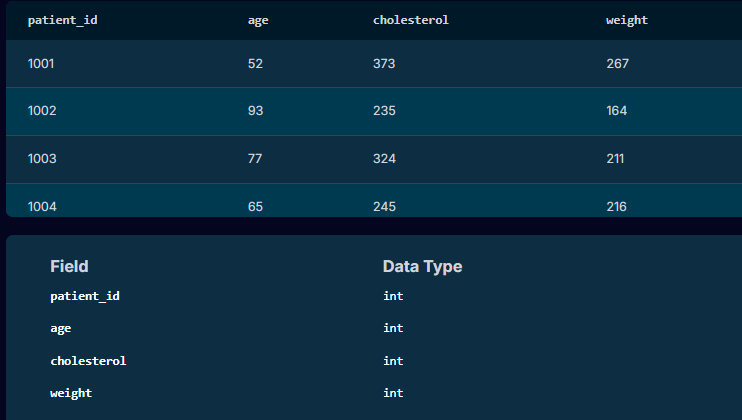
During a clinical trial the Principal Investigator notified the team that she has seen an uptick in heart attacks for his patients over the past few months. She has been noticing some trends across his patients and wanted to get ahead of things by reaching out to current patients who are at a high risk of a heart attack.

So, we needed to identify which patient she needs to reach out to and provide that information to her.

The criteria was that the patient was over the age of 50, cholesterol level of 240 or over, and weight 200 or greater. If all these criteria was matched then they are at high risk of having a heart attack.

In summary, the SQL query written for the Doctor:

SELECT *
FROM patients
WHERE age > 50 AND cholesterol >= 240 AND weight >= 200


Innovation – Collaboration

Customer Churn Analysis My SQL Breakdown


Below are BA-style SQL queries I’ve used on  projects. I’ll explain why I ran each query, what question I was answering, and how it influenced the project.


1️⃣ Customer Churn Analysis


Project: Telecom – Understanding Why Customers Leave


Business question

“Who is churning, and when does it happen?”


SQL I used

 
SELECT
c.contract_type,
COUNT(*) AS total_customers,
SUM(CASE WHEN c.churn_flag = 'Y' THEN 1 ELSE 0 END) AS churned_customers,
ROUND(
SUM(CASE WHEN c.churn_flag = 'Y' THEN 1 ELSE 0 END) * 100.0 / COUNT(*),
2
) AS churn_rate_pct
FROM customers c
GROUP BY c.contract_type
ORDER BY churn_rate_pct DESC;


🔍 Step-by-Step Explanation


1️⃣ FROM customers c

FROM customers c

  • This tells SQL we’re querying the customers table.

  • c is an alias — it makes the query shorter and easier to read.

🧠 BA thinking:

“This table should have one row per customer with contract and churn info.”


2️⃣ SELECT c.contract_type

SELECT c.contract_type,

  • This groups customers by contract type
    (e.g. Monthly, 12-Month, 24-Month)

🧠 BA insight:

“I want to compare churn across different contract models.”


3️⃣ COUNT(*) AS total_customers

COUNT(*) AS total_customers,

  • Counts how many customers are in each contract type.

  • COUNT(*) counts all rows in that group.

📊 Example output:

contract_typetotal_customers
Monthly8,000
12-Month5,000

🧠 Why I need this:

I can’t talk about churn percentages without knowing the base size.


4️⃣ Counting Churned Customers

SUM(CASE WHEN c.churn_flag = ‘Y’ THEN 1 ELSE 0 END)


SUM(CASE WHEN c.churn_flag = ‘Y’ THEN 1 ELSE 0 END) AS churned_customers,


What this does

  • CASE checks each customer:

    • If churn_flag = 'Y' → count as 1

    • Otherwise → count as 0

  • SUM() adds them up per contract type.

📊 Example:

contract_typechurned_customers
Monthly2,400
12-Month400

🧠 BA translation:

“How many customers actually left under each contract?”


5️⃣ Calculating Churn Rate (%)

ROUND( churned / total * 100, 2 )


ROUND(
SUM(CASE WHEN c.churn_flag = ‘Y’ THEN 1 ELSE 0 END) * 100.0 / COUNT(*),
2
) AS churn_rate_pct


Step-by-step logic

  1. Numerator:

SUM(CASE WHEN churn_flag = ‘Y’ THEN 1 ELSE 0 END)

→ number of churned customers

2. Denominator:

COUNT(*)

→ total customers

3. Multiply by 100.0

    • Forces decimal calculation (important!)

    • Avoids integer division (e.g. 1/10 = 0)

4. ROUND(..., 2)

      • Rounds to 2 decimal places

      • Makes it presentation-ready for stakeholders

contract_typechurn_rate_pct
Monthly30.00
12-Month8.00

🧠 Why this matters:

Percentages tell a much clearer story than raw numbers.


6️⃣ GROUP BY c.contract_type

GROUP BY c.contract_type

  • This tells SQL:

    “Do all these calculations per contract type

Without this:

  • SQL wouldn’t know how to group the counts and sums.


 (%)7️⃣ ORDER BY churn_rate_pct DESC

ORDER BY churn_rate_pct DESC;

  • Sorts results from highest churn to lowest

  • Puts the biggest problem at the top

🧠 BA move:

I can immediately say:
“Monthly contracts are our biggest churn risk.”

contract_typetotal_customerschurned_customerschurn_rate_pct
Monthly8,0002,40030.00
12-Month5,0004008.00
24-Month3,000903.00


🎯 How I Used This as a Business Analyst

I took this result and:

  • Presented it in stakeholder workshops

  • Used it to justify onboarding improvements

  • Feed it into dashboards

  • Define targeted retention initiatives

  • Influence product and pricing decisions

🧠 Key Takeaway

This query doesn’t just “show data” —
it supports a business decision.

How SQL helped

  • Showed churn was highest on monthly contracts

  • Proved churn wasn’t evenly distributed

  • Gave evidence to redesign contract terms and onboarding

👉 This shaped the business case, not just a report.

Innovation – Collaboration

Business Analytics

Oil & Gas Project SQL

Project: Production Optimization & Cost Control for Onshore Oil Fields

Project Background

Our company was facing declining production in several mature oil fields while operating costs were increasing. Management needed a clear, data-driven view of:

  • Which wells were underperforming

  • Where downtime was causing production losses

  • How much revenue was being lost due to equipment failures and delays

The data existed, but it was scattered across multiple systems:

  • Production system (daily oil, gas, water volumes)

  • Maintenance system (equipment failures, work orders, downtime)

  • ERP/Finance system (operating costs, budgets, revenue)

My role as a Business Analyst was to use SQL to integrate these systems, analyze the data, and provide insights to operations and leadership.


How I Used SQL – Step by Step

1. Integrating Multiple Data Sources

I wrote SQL queries that joined tables across systems using keys such as Well_ID, Field_ID, and Date.

Example tasks:

  • Join daily production data with downtime records

  • Link maintenance work orders with production loss

  • Combine cost data with production volumes

This created a single, trusted dataset for analysis.


2. Production Performance Analysis

Using SQL aggregations and window functions, I:

  • Calculated daily, monthly, and yearly production

  • Compared actual vs. target production

  • Ranked wells by performance using RANK() and ROW_NUMBER()

Business insight:
We discovered that 15% of wells were responsible for over 40% of total production losses.


3. Downtime & Non-Productive Time (NPT)

I used SQL to:

  • Calculate total downtime per well

  • Classify downtime by root cause (mechanical, electrical, human error)

  • Compute lost barrels = downtime hours × average production rate

Business insight:
A single compressor failure was causing over $2M per year in lost production.


4. Cost & Profitability Analysis

By joining production and cost tables, I calculated:

  • Lifting cost per barrel

  • Well-level profitability

  • Budget vs. actual variances

Business insight:
Some wells were producing oil at a higher cost than their market value, leading to operational losses.


5. Data Validation & Quality Control

I used SQL to:

  • Identify missing production values

  • Detect duplicate downtime entries

  • Flag wells with abnormal production spikes

This improved trust in reports used by engineers and management.


6. Deliverables

From my SQL datasets, I:

  • Fed clean data into Power BI dashboards

  • Created operational reports for engineers

  • Provided executive summaries for leadership


Final Business Impact

  • Reduced unplanned downtime by 18%

  • Improved production forecasting accuracy

  • Identified cost-saving opportunities worth millions annually

  • Enabled data-driven decisions for field optimization

>>>>>>>>>>>>>>>>>>>>>>>>>>>>>>>>>>>>>>>>>>>>>>>>>>>>>>>>>

How I Use SQL in an Oil & Gas Project

Role: Business Analyst
Project: Production Loss & Cost Optimization for Onshore Oil Fields


Project Background

The company was losing revenue due to:

  • High unplanned downtime

  • Underperforming wells

  • Rising operating costs

Data existed in three systems:

  1. Production database

  2. Maintenance system

  3. Finance/ERP system

My task was to use SQL to integrate the data, analyze root causes, and provide management insights.


Example Data (Simplified)

Table 1: production_daily

well_idprod_dateoil_bblgas_mcfwater_bbl
W012024-01-01520300120
W012024-01-02000
W022024-01-0121014090
W022024-01-0219013085

Table 2: downtime_log

well_iddt_datehours_downcause
W012024-01-0224Mechanical
W022024-01-026Electrical

Table 3: well_costs

well_idcost_dateoperating_cost_usd
W012024-01-018000
W012024-01-027800
W022024-01-014200
W022024-01-024000

1. Linking Production and Downtime

 
SELECT p.well_id, p.prod_date, p.oil_bbl, d.hours_down, d.cause FROM production_daily p LEFT JOIN downtime_log d ON p.well_id = d.well_id AND p.prod_date = d.dt_date;

Insight:
Well W01 produced zero oil on 2024-01-02 due to 24 hours of mechanical downtime.


2. Calculate Lost Production Due to Downtime

 
SELECT d.well_id, d.dt_date, d.hours_down, ROUND(AVG(p.oil_bbl) / 24 * d.hours_down, 2) AS lost_oil_bbl FROM downtime_log d JOIN production_daily p ON d.well_id = p.well_id GROUP BY d.well_id, d.dt_date, d.hours_down;

Insight:
W01 lost ~520 barrels in one day from downtime.


3. Identify Underperforming Wells

 
SELECT well_id, SUM(oil_bbl) AS total_oil FROM production_daily GROUP BY well_id HAVING SUM(oil_bbl) < 300;

Insight:
W02 is producing significantly less oil than W01.


4. Cost per Barrel (Profitability)

 
SELECT p.well_id, SUM(c.operating_cost_usd) / NULLIF(SUM(p.oil_bbl),0) AS cost_per_barrel FROM production_daily p JOIN well_costs c ON p.well_id = c.well_id AND p.prod_date = c.cost_date GROUP BY p.well_id;

Insight:
Some wells were producing at a higher cost than market oil price → candidates for optimization or shut-in.


5. Downtime Root Cause Analysis

 
SELECT cause, SUM(hours_down) AS total_hours FROM downtime_log GROUP BY cause ORDER BY total_hours DESC;

Insight:
Mechanical failures were the top cause of production loss.


Business Impact

  • Identified wells causing 40% of production losses

  • Linked downtime directly to revenue loss

  • Flagged high-cost, low-output wells

  • Enabled management to prioritize maintenance and optimize field performance


Innovation – Collaboration

Business Analytics

Waterfall vs. Agile

In business analytics, Waterfall and Agile are two distinct methodologies used for managing projects. Each has its own strengths and is suited to different types of business environments and project needs.

I have experienced  methods both over my career in  projects for clients where they were utilized depending on the clients needs:
 

🎯 Real-Life Project: Launching a New Online Banking Feature


Client’s Business Goal

Add a “Spend Tracker” feature to a bank’s mobile app that categorizes customer transactions and offers spending insights. 


🔵 Waterfall Approach


Project:


The client which was a traditional bank with strict regulatory and security controls opted for the Waterfall methodology.


The process I used

 
  1. Requirement Gathering (BA Role)

    • Conduct detailed stakeholder interviews and workshops.

    • Documents everything in a Business Requirements Document (BRD) and Functional Requirements Document (FRD).

    • These are reviewed, revised, and signed off.

  2. Design

    • The technical part of the team designs the system based entirely on the signed-off documents.

  3. Development

    • Work with the developers code the full feature as per specs. No major changes are accepted mid-project.

  4. Testing

    • Team up with the QA to test the complete system against original specs using test cases written from the FRD.

  5. Deployment

    • The final product is released only after all phases are complete.


Pros


Clear roadmap

Thorough documentation

Easy to measure progress


Cons


Slow to deliver value

Inflexible to changes

Risk of misaligned outcomes if initial assumptions were off


🟢 Agile Approach


Project:


A fintech start-up wants to implement the Spend Tracker in their mobile app. They use Agile for speed and flexibility.


The process I used

 
  1. Sprint Planning (BA Role)

    • Worked with the Product Owner and team to break the features into small user stories (e.g., “As a user, I want to see my spending by category”).

  2. Incremental Delivery

    • Myself and the Developers build and release small parts of the feature every 2 weeks (sprint).

    • I would then refine and update requirements as feedback comes in.

  3. Daily Stand-ups & Backlog Grooming

    • Continuous collaboration with the team to clarify or adjust requirements.

  4. Iterative Testing

    • BA & QA tests in each sprint.

    • Changes and improvements happen continuously.

  5. Frequent Releases

    • Users start seeing value after the first few sprints rather than waiting months.


Pros


Fast feedback loops

Highly adaptable

Early value delivery


Cons


Less formal documentation

Requires high team involvement

Scope creep can be a risk if not managed well


🔍 Waterfall vs. Agile Summary Table


Aspect


Waterfall


Agile


Project Structure


Sequential (phases: plan → build → test)


Iterative (sprints/cycles)


BA Involvement


Front-loaded


Continuous


Documentation


Extensive (BRD, FRD, RTM, etc.)


Lightweight (User Stories, AC)


Change Handling


Difficult once dev starts


Expected and welcomed


Delivery Timeline


One big release at end


Frequent small releases


Stakeholder Engagement


At milestones


Ongoing and active


Best For


Fixed-scope, compliance-heavy projects


 Innovative, evolving, user-focused work
 

🧠 In Summary My Viewpoint


Use Waterfall for: Government systems, infrastructure projects, banking/insurance/pharmaceutical/oil and gas compliance.

Use Agile for: Customer-facing apps, SaaS tools, products with fast-changing requirements.


Innovation – Collaboration

Business Analytics

SLRA

📄 What is a Service Level Requirement Agreement (SLRA) in Business Analytics?

A Service Level Requirement Agreement (SLRA) defines the expected level of service between a service provider (e.g., IT, third-party vendor) and a business unit. It outlines measurable performance metrics like uptime, response time, resolution time, data availability, and more. In Business Analytics, an SLRA ensures that data platforms, reporting tools, and analytics systems perform reliably and meet business needs.

🧠 Real-Life Scenario: Retail Company Implementing a BI Dashboard

📍 Context:

A national retail chain is launching a new Business Intelligence (BI) dashboard to monitor store performance and customer behavior. The business analyst is responsible for documenting an SLRA between the Data Engineering team (internal service provider) and the Marketing and Operations departments (end users).

📝 What to Include in an SLRA (with Examples)


Section


Description


Example


1. Purpose & Scope


Define why the SLRA is needed and what systems or services it covers.


Covers BI dashboard availability, data refresh rate, and report delivery timelines.


2. Service Description


Detailed explanation of what service is being provided.


Daily dashboard updates, real-time campaign performance reports.


3. Service Hours


When services will be available.


BI dashboards available from 6:00 AM – 10:00 PM, Mon–Sun.


4. Performance Metrics


Define key SLAs (Service Level Agreements).


– Uptime: 99.5% monthly


 – Daily refresh complete by 7:00 AM


 – Report generation in under 10 seconds


5. Incident Management


Define how issues are reported and resolved.


– Critical issue response: within 1 hour


 – Medium issue: within 4 hours


 – Resolution: within 24 hours


6. Data Accuracy & Quality


Agree on data integrity expectations.


98% accuracy for transactional data; daily data validation logs reviewed.


7. Dependencies


Note any technical or operational dependencies.


Relies on the POS system exporting data before 2:00 AM.


8. Reporting & Monitoring


How performance is monitored and communicated.


Monthly SLA reports reviewed in Ops-MIS meetings.


9. Escalation Path


Escalation contacts and hierarchy.


Step-by-step contact protocol from analyst to senior management.


10. Review Cycle


How often the SLRA is reviewed.


Reviewed quarterly with both parties.


11. Approval & Sign-off


Stakeholder signatures and dates.


Signed by IT Manager, Marketing Director, and Business Analyst.

👣 How to Write It – Step-by-Step (BA Perspective)

  1. Conduct Stakeholder Interviews

    • Meet with service providers and users to understand expectations.

    • Gather technical capabilities and business needs.

  2. Document Requirements

    • Use clear, measurable terms (e.g., response time = 2 hours).

    • Avoid vague language like “as soon as possible.”

  3. Facilitate Workshops

    • Align technical feasibility with business expectations.

    • Use whiteboards or shared documents to collaborate.

  4. Draft the SLRA

    • Write in formal language, using a business-oriented structure.

    • Include appendices for detailed KPIs or escalation charts.

  5. Review & Sign Off

    • Circulate for feedback.

    • Obtain formal approval from key stakeholders.

📂 Sample Document Header

Document Title: Service Level Requirement Agreement – BI DashboardVersion: 1.0Prepared by: [Your Name], Business AnalystDate: 23 May 2025Status: Approved

🛠️ Tools to Use

  • MS Word or Google Docs – Document drafting

  • Confluence – Live documentation & collaboration

  • Smartsheet or Excel – SLA metric tracking

  • Jira/ServiceNow – Issue tracking & response metrics

Innovation – Collaboration

Business Analytics

Data Management Plan (DMP)

📊 What is a Data Management Plan (DMP) in Business Analytics?

A Data Management Plan (DMP) is a structured document that outlines how data will be collected, stored, protected, shared, and archived throughout the lifecycle of a business analytics project. It’s essential for ensuring data integrity, compliance, security, and usability, especially in projects involving sensitive or large-scale data.

🧠 Real-Life Scenario: Financial Services Company Launching a Customer Analytics Platform

📍 Context:

A UK-based financial services company is implementing a customer analytics platform to gain insights into client behavior, transaction trends, and product engagement.

The Business Analyst is responsible for developing a Data Management Plan (DMP) to ensure that data from multiple internal systems (CRM, transaction databases, web logs) is handled properly.

📝 What to Include in a Data Management Plan

Below is a section-by-section breakdown of a DMP a Business Analyst might create:

📄 Data Management Plan Template Breakdown

1. Project Overview

  • Project name and description

  • Purpose of the data (e.g., customer segmentation, fraud detection)

2. Data Collection

  • Sources: CRM, ERP, call center logs, website analytics

  • Types of data: structured (SQL databases), semi-structured (JSON logs), unstructured (audio transcripts)

  • Tools used: ETL tools like Talend, Informatica, or custom scripts

3. Data Quality Management

  • Data cleansing procedures (handling duplicates, nulls, outliers)

  • Validation steps (e.g., data profiling, anomaly detection)

  • Ownership/responsibilities for data accuracy

4. Metadata Standards

  • Define how data fields will be labeled, tagged, and categorized

  • Use of data dictionaries and naming conventions

5. Data Storage and Security

  • Where data will be stored (cloud vs. on-prem)

  • Security controls (encryption, access controls, firewall rules)

  • Compliance with GDPR, UK Data Protection Act, or other relevant laws

6. Data Access and Sharing

  • Who has access (internal teams, partners, third parties)

  • User roles and permissions

  • API integrations and dashboards for data access

7. Data Retention and Archiving

  • How long data will be retained (e.g., 7 years for financial data)

  • Archiving processes (cold storage, backup schedules)

8. Data Disposal

  • Secure deletion protocols

  • Certification or audit trails for deleted data

9. Risk Management

  • Identification of risks (data loss, breach, corruption)

  • Mitigation strategies (regular backups, failover systems)

10. Review and Maintenance

  • Frequency of DMP reviews

  • Responsible stakeholders for updating the plan

📌 BA’s Key Responsibilities

  • Collaborate with data architects, compliance officers, and business stakeholders

  • Document findings and standards in a clear, structured DMP

  • Facilitate workshops to validate and approve the plan

  • Ensure alignment with corporate data governance policies

📂 Final Deliverable Example

Document Title: Data Management Plan – Customer Analytics ProjectVersion: 1.2Prepared by: Business AnalystDate: 23 May 2025Status: Approved by Data Governance Board

Innovation – Collaboration

Business Analytics

Vendor Proposal (VP)

📑 What is a Vendor Proposal (VP) in Business Analytics?

A Vendor Proposal (VP) is a formal document submitted by an external service provider or vendor in response to a company’s Request for Proposal (RFP). It outlines how the vendor intends to meet the business’s needs, including solutions, timelines, pricing, and qualifications.

In business analytics, Vendor Proposals are used when selecting analytics platforms, data warehouses, BI tools, or consulting services.

🧠 Real-Life Scenario: Selecting a New Business Intelligence (BI) Tool

📍 Context:

A UK-based retail company is replacing its outdated reporting system. The Business Analyst (BA), in collaboration with IT and procurement, sends out an RFP to vendors like Tableau, Power BI, and Qlik.

Vendors reply with Vendor Proposals, and the BA helps evaluate and document these proposals.

📋 What Does a Vendor Proposal Typically Contain?

While the vendor writes the proposal, the Business Analyst evaluates it. Below is what the VP should include:

  1. Executive Summary

    • Overview of the vendor’s understanding of the client’s needs

    • High-level solution description

  2. Proposed Solution

    • Technical and functional features (e.g., dashboarding, real-time data support)

    • Integration capabilities with current systems (e.g., ERP, CRM)

  3. Project Plan

    • Timeline of deliverables

    • Phases (e.g., kickoff, implementation, testing, training)

  4. Team Qualifications

    • Bios and experience of key personnel

    • References from similar projects

  5. Cost Breakdown

    • Software licenses

    • Implementation fees

    • Support/maintenance costs

  6. Service Level Agreements (SLAs)

    • Uptime commitments

    • Response time for incidents

  7. Legal & Compliance

    • GDPR adherence

    • Data privacy and protection policies

🧾 BA’s Role: How to Write the Vendor Proposal Evaluation Document

As a Business Analyst, you don’t typically write the VP, but you:

Evaluate and summarize vendor submissions✅ Compare them against business and technical requirements✅ Facilitate vendor demosDocument findings in a Vendor Proposal Evaluation Matrix

📝 Example: Vendor Proposal Evaluation Matrix


Criteria


Vendor A (Tableau)


Vendor B (Power BI)


Vendor C (Qlik)


Meets all functional requirements


Data source integrations


✅ (strong)


✅ (limited)


Pricing


£15K/year


£10K/year


£13K/year


Ease of Use


High


Medium


High


GDPR Compliance


Training & Support


24/7


Business hours


24/5


Final Score (1–5)


4.5


3.9


4.2

🎯 Final Deliverable (from BA):

  • Vendor Evaluation Summary Document

    • Executive summary

    • Key findings from each vendor proposal

    • Recommendation with rationale

🔧 Tools Often Used:

  • Excel (for scoring matrix)

  • Word/Google Docs (for report)

  • Teams/Zoom (vendor demos)

  • SharePoint or Confluence (for stakeholder sharing

Innovation – Collaboration

Business Analytics

Data Migration

📊 What is Data Migration in Business Analytics?

Data migration is the process of transferring data from one system or storage format to another. In business analytics, this is a critical activity, especially during system upgrades, cloud transitions, or mergers and acquisitions, where data needs to be moved, transformed, and validated to support ongoing business operations and analytics.

🔍 Real-Life Scenario: Retail Chain Switching to a New ERP System

🏢 Background:

A UK-based retail chain is migrating from a legacy Enterprise Resource Planning (ERP) system to a new cloud-based solution (e.g., SAP or Oracle NetSuite).

🎯 Goal:

Ensure seamless transfer of all critical data—like inventory, customer records, supplier details, and transaction history—into the new system without data loss or integrity issues.

🔄 Steps Involved in Data Migration (BA Perspective):

1. Planning Phase

  • What the BA does:

    • Identify all data sources involved (e.g., old ERP, spreadsheets, CRM).

    • Define scope: What data will be migrated (master data, transactional data, historical data)?

    • Document data ownership, dependencies, and risks.

    • Collaborate with IT, DBAs, and data stewards.

  • Deliverable: Data Migration Strategy Document

2. Data Mapping & Analysis

  • What the BA does:

    • Work with technical teams to map fields from the source system to the target system.

    • Identify gaps, redundant fields, and mismatches.

    • Capture transformation logic (e.g., combine “First Name” and “Last Name” into “Full Name”).

  • Deliverable: Data Mapping Document

3. Data Cleansing

  • What the BA does:

    • Identify and document incomplete, duplicate, or outdated data.

    • Define rules for data quality improvement before migration.

  • Tools involved: Excel, SQL, data profiling tools (e.g., Talend, Informatica)

4. Testing (Mock Migration)

  • What the BA does:

    • Define and run test cases to validate that migrated data is accurate and complete.

    • Work with QA to perform sample validations (e.g., are all customer records present in the new system?).

  • Deliverable: Data Migration Test Plan

5. Execution

  • What the BA does:

    • Coordinate with IT for go-live.

    • Monitor execution and validate critical data during migration.

  • Deliverable: Migration Readiness Checklist

6. Post-Migration Review

  • What the BA does:

    • Validate reports and dashboards.

    • Ensure the business is using accurate data.

    • Log and resolve data-related issues quickly.

  • Deliverable: Post-Migration Validation Report

✅ Success Criteria for Data Migration

  • No critical data loss

  • Data accuracy & completeness

  • No disruption to business processes

  • Stakeholder sign-off on migrated data

🧠 Key BA Skills in Data Migration

  • Data mapping & documentation

  • Stakeholder coordination

  • SQL/data analysis

  • Testing and validation planning

  • Risk and change management

Innovation – Collaboration

Business Analytics

Regulatory Affairs Impact Assessment (RAIA)

In business analytics, particularly in industries like pharmaceuticals, healthcare, finance, and energy, a Regulatory Affairs Impact Assessment (RAIA) is a critical document used to evaluate the business impact of new or updated regulatory requirements. This ensures that the company remains compliant, while identifying changes needed in processes, systems, documentation, or training.

✅ Real-Life Scenario: Pharmaceutical Company — New MHRA Labelling Regulation

You’re a Business Analyst working in a UK-based pharmaceutical company. The MHRA (Medicines and Healthcare products Regulatory Agency) has issued new labelling regulations for prescription packaging, effective in 6 months.

Your task is to lead a Regulatory Affairs Impact Assessment (RAIA) to:

  • Evaluate the scope of impact

  • Assess business, system, and process changes

  • Inform relevant stakeholders

  • Recommend an action plan

📄 What is a RAIA?

A Regulatory Affairs Impact Assessment (RAIA) is a formal document that:

  • Summarises the new regulatory requirement

  • Assesses its impact across departments

  • Identifies gaps between current practice and required standards

  • Proposes actions to become compliant before the effective date

🧾 Structure of a RAIA Document

1. Executive Summary

  • Brief summary of the regulation and the high-level impact on the business

2. Regulatory Requirement Overview

  • Regulatory authority (e.g., MHRA, FCA, EMA, OFGEM)

  • Summary of the regulation or change

  • Effective date and compliance deadline

  • Reference to official documentation

3. Business Area Impact Assessment


Department


Impact Description


Level


Owner


Regulatory Affairs


Label templates need to be redesigned


High


Regulatory Manager


Manufacturing


New packaging process needed


Medium


Ops Manager


IT Systems


Update to labelling software


Medium


IT Business Analyst


Legal


Review of compliance exposure


Low


Legal Counsel


Training


Staff retraining required for new packaging process


Medium


HR/Training Lead

4. Gap Analysis

  • Current state vs. required state

  • Specific non-compliance risks

  • Resource or skill gaps

5. Recommended Actions

  • Summary of tasks required to meet the regulation

  • Timeline aligned with regulatory deadline

  • Dependencies or risks

6. Stakeholder Involvement

  • Who needs to be informed, consulted, or accountable

  • RACI matrix optional

7. Risks and Mitigation

  • Identify compliance, operational or reputational risks

  • Risk rating and mitigation strategy

8. Conclusion and Approval

  • Overall recommendation (e.g., proceed with update plan)

  • Names/signatures of approvers (Regulatory, Legal, PMO)

🛠️ How to Write It – BA Steps

  1. Engage Regulatory Affairs to obtain and interpret the new rule

  2. Conduct stakeholder workshops/interviews with affected departments

  3. Map current vs. future state using process flows or gap analysis

  4. Document findings in the RAIA template

  5. Review with legal and compliance for accuracy

  6. Present recommendations to leadership or PMO

  7. Ensure actions are tracked (possibly in project planning tools)

🎯 Purpose of a RAIA

  • Ensure regulatory compliance

  • Prevent penalties or reputational damage

  • Align cross-functional teams

  • Inform project planning or business case development

Innovation – Collaboration

Business Analytics

Organisational Process Qualification (OPQ)

In business analytics, OPQ typically refers to an Organisational Process Qualification, Operational Process Qualification, or sometimes Organisational Performance Qualification, depending on the industry. However, OPQ is not a standard business analyst document like BRD, FRD, or SWOT.

That said, in some UK-based enterprise and operational change contexts, OPQ may refer to a high-level document that assesses the operational readiness or performance of a process/system before implementation. It’s often used in regulatory, operational risk, or process validation settings, particularly in regulated industries such as pharmaceuticals, manufacturing, or finance.

✅ Scenario: Operational Readiness for a New Inventory Management System in Retail

You’re a Business Analyst working with a large UK retail chain implementing a new Inventory Management System (IMS) across all warehouses.

Before the system goes live, the Operations Director requests an OPQ document to validate whether the processes, staff, and systems are ready.

📄 What is OPQ in This Scenario?

OPQ (Operational Process Qualification) is a document that:

  • Assesses whether the new or changed operational process is fit-for-purpose.

  • Validates if it meets defined business and quality standards.

  • Checks if all requirements, training, tools, and people are aligned for a safe and successful go-live.

🧠 What to Include in an OPQ Document

Here’s a real-world outline of what a Business Analyst might include:

1. Introduction

  • Purpose of the OPQ

  • Background of the process/system being assessed

  • Project reference or link to BRD

2. Process Overview

  • Description of the business process under review

  • “As-is” vs. “To-be” comparison

  • Key workflows or diagrams (optional)

3. Readiness Assessment


Category


Criteria


Status


Evidence


People


Staff trained and available


✅ Ready


Training logs


Process


SOPs updated and published


✅ Ready


SOP links


Technology


System configured and tested


🔶 In progress


UAT results


Data


Master data cleansed and migrated


✅ Complete


Data audit logs


Compliance


GDPR / HSE / other standards reviewed


✅ Compliant


Compliance checklist


Risk Mitigation


Known risks logged and managed


✅ Mitigated


Risk log reference

4. Qualification Testing Summary

  • Summary of any dry runs, simulations, or trial phases

  • Outcome of process validation or test scenarios

5. Gaps Identified

  • List of any remaining issues or constraints

  • Action plan or owner assignment

6. Recommendation

  • Summary opinion on readiness

  • Any pre-conditions for approval

  • Approval section (signed by BA, Ops Manager, QA if applicable)

🧾 How to Write It

  1. Gather inputs from testing reports, training records, process owners, and stakeholder interviews.

  2. Structure the report using a standard OPQ template.

  3. Use real, audit-ready evidence to support your assessment.

  4. Validate risks and readiness with stakeholders before submitting the OPQ.

  5. Use a RAG (Red-Amber-Green) status to simplify reporting and highlight readiness visually.

🎯 Purpose of the OPQ

  • Ensure the business process is ready for live operation.

  • Avoid compliance failures, downtime, or user confusion.

  • Validate that all teams (ops, IT, training, legal, compliance) are aligned.

💡 BA Pro Tip

Always align your OPQ with:

  • The Business Case (to ensure value is delivered),

  • The Requirements Documents (to ensure scope is met),

  • And the Test Plans (to verify performance is validated).

Innovation – Collaboration

Business Analytics

SWOT/Pestle Analysis

🔍 Scenario: Implementing a New Customer Relationship Management (CRM) System for a UK Retail Chain

You’re a Business Analyst working with a national retail chain planning to upgrade its CRM system to better manage customer engagement, loyalty programs, and sales.

Before selecting a solution, leadership wants a strategic analysis of internal and external factors that could impact success.

🧠 What is a SWOT Analysis?

SWOT stands for:

  • Strengths (internal positives)

  • Weaknesses (internal negatives)

  • Opportunities (external positives)

  • Threats (external negatives)

It helps evaluate your organisation’s position before making a decision or implementing a change.

✅ How to Write a SWOT Analysis

  1. Gather information through stakeholder interviews, data analysis, and current-state assessments.

  2. Categorise insights into the four SWOT quadrants.

  3. Keep entries brief and specific.

  4. Align findings with project goals (e.g., improved customer engagement, reduced churn).

📄 Example SWOT for CRM Implementation:


SWOT


Details


Strengths


– Strong brand recognition


 – Loyal customer base


 – Solid budget


Weaknesses


– Legacy systems not integrated


 – Poor data quality


 – No mobile app


Opportunities


– New CRM with AI capabilities


 – Market shift to digital engagement


Threats


– Competitors launching loyalty apps


 – GDPR risks if data is mishandled

🌍 What is a PESTLE Analysis?

PESTLE stands for:

  • Political

  • Economic

  • Social

  • Technological

  • Legal

  • Environmental

This analysis evaluates macro-environmental factors that could influence your project or organisation.

✅ How to Write a PESTLE Analysis

  1. Research external trends (use news, government policy documents, industry reports).

  2. Break down findings into each PESTLE category.

  3. Focus on what’s relevant to your project or sector.

  4. Relate risks or enablers to business strategy and stakeholder concerns.

📄 Example PESTLE for CRM Implementation:


PESTLE Factor


Details


Political


– UK data privacy laws (post-Brexit)


 – Government support for digital retail


Economic


– Inflation increasing tech costs


 – Budget cuts in retail sector


Social


– Growing demand for personalised services


 – Shift to online shopping


Technological


– Rise of cloud-based CRM platforms


 – AI/ML for customer insights


Legal


– GDPR compliance requirements


 – New regulations on data transfers


Environmental


– CSR focus: systems should reduce paper use


 – Preference for green data centers

🛠 Tools You Can Use

  • Microsoft Word or Excel (simple tables)

  • Miro or Lucidchart (for visual maps)

  • PowerPoint (for executive presentations)

  • Confluence or Notion (for collaboration)

👣 When to Use These Analyses

  • During project initiation or discovery phase

  • When conducting a feasibility study

  • To support a Business Case

  • During a strategic review or risk assessment

🧩 Bonus Tip

SWOT is internal+external but subjective.PESTLE is strictly external and analytical.Using both gives a full picture to inform decisions.

Innovation – Collaboration

Business Analytics

Risk and Issue Logs (BA perspective)

In business analytics, a Risk and Issue Log is a critical document that helps identify, track, and manage potential problems and active issues that could impact the success of a project. From a Business Analyst (BA) perspective, the log ensures transparency, supports mitigation planning, and helps stakeholders make informed decisions.

🧠 What Are Risks and Issues?


Term


Definition


Risk


A potential event or condition that may occur and negatively impact the project (uncertain).


Issue


A problem that has already occurred and needs immediate attention or resolution.

🏢 Real-Life Scenario: CRM System Upgrade for Sales Team

Context:

You’re a Business Analyst on a project to upgrade the company’s CRM. During stakeholder interviews and vendor evaluation, you uncover several potential risks and one active issue that may delay requirements gathering.

🛠️ How to Write a Risk and Issue Log

📋 Standard Columns in the Log:


Field


Description


ID


Unique identifier (e.g., R001, I001)


Type


Risk or Issue


Description


Clear and concise summary of the risk or issue


Impact


What area of the project it affects


Likelihood (Risk Only)


Low / Medium / High


Impact Level


Low / Medium / High


Owner


Person responsible for managing or resolving


Mitigation/Resolution Plan


Action plan to prevent or address


Status


Open / In Progress / Resolved / Closed


Date Identified


When the risk/issue was first recorded


Target Resolution Date


Planned resolution timeline

📌 Example Risk Entry:


ID


Type


Description


Likelihood


Impact Level


Owner


Mitigation Plan


Status


Date Identified


Target Resolution


R001


Risk


Sales team may not adopt new CRM if UI is too complex


Medium


High


BA


Involve Sales team in UAT and select user-friendly vendor


Open


2025-05-20


2025-06-15

📌 Example Issue Entry:


ID


Type


Description


Impact Level


Owner


Resolution Plan


Status


Date Identified


Target Resolution


I001


Issue


Key Sales stakeholder unavailable for requirements workshops


High


PM


Reschedule workshops and escalate to sponsor


In Progress


2025-05-18


2025-05-25

🧩 How a BA Uses the Risk & Issue Log

🔍 1. Identifying Risks & Issues

  • During interviews, workshops, or requirement reviews.

  • Ask: “What might go wrong?” or “What’s already impacting our progress?”

✍️ 2. Documenting Clearly

  • Use objective, neutral language.

  • Avoid blame—focus on the problem and solution.

🔄 3. Reviewing Regularly

  • Update status in weekly stand-ups or project check-ins.

  • Highlight escalated issues to the PM or sponsor early.

🗣️ 4. Communicating with Stakeholders

  • Share an updated log via email or project management tools like Jira, Trello, or Confluence.

  • Include in project updates or dashboards.

✅ Bonus Tip

Use color-coding to visually highlight:

  • 🔴 High-impact/high-likelihood risks

  • 🟡 Medium-level concerns

  • 🟢 Closed or mitigated items

Innovation – Collaboration

Business Analytics

Project Charter

 (Sometimes co-created with PM) 

In business analytics, a Project Charter is a foundational document that formally initiates a project, outlines its goals, and gives the project manager (PM) and team the authority to begin work. Often co-created by the Business Analyst (BA) and the Project Manager, it aligns stakeholders and defines the scope, objectives, stakeholders, and resources early in the project lifecycle.

📍 Real-Life Scenario: Launching a Customer Feedback Analysis Platform

Context:

You’re a Business Analyst at a retail company. Leadership wants to implement a system that uses AI to analyze customer feedback across reviews, emails, and surveys. The project has been approved in principle, and now you, alongside the PM, need to write the Project Charter to formally kick it off.

🧾 What Is a Project Charter?

A Project Charter is a high-level document that:

  • Authorizes the project

  • Outlines the purpose, scope, and stakeholders

  • Serves as a reference throughout the project

  • Helps prevent scope creep

  • Is often signed by a project sponsor

🛠️ How to Write a Project Charter

1. Project Title & Description

Clear and concise name of the project and what it’s about.

Example:

Title: AI-Driven Customer Feedback Analysis PlatformDescription: Implementation of an AI platform that consolidates and analyzes customer feedback across multiple channels to improve decision-making in product and service development.

2. Project Purpose / Justification

Why is this project being done? What business problem does it solve?

Example:

The current customer feedback process is manual, time-consuming, and siloed. This project aims to automate sentiment analysis and generate actionable insights to improve customer satisfaction and retention.

3. Objectives

SMART (Specific, Measurable, Achievable, Relevant, Time-bound) goals.

Example:

  • Integrate 3 primary data sources (email, reviews, surveys) within 3 months

  • Deploy dashboard with sentiment trends by Q3

  • Reduce feedback response time by 40% in 6 months

4. Scope (In & Out)

Clearly define what the project will and won’t do.

In Scope:

  • Sentiment analysis engine

  • Data connectors for email and survey platforms

  • Real-time dashboard

Out of Scope:

  • Manual customer follow-up

  • Feedback data from physical receipts

5. Stakeholders

List of key people involved in or affected by the project.


Stakeholder


Role


Responsibilities


Project Sponsor


Chief Marketing Officer


Funding and approvals


Project Manager


Delivery oversight


Planning, budget, scheduling


Business Analyst


Requirement gathering


BRD, stakeholder engagement


Data Scientist


Model development


Sentiment scoring


IT Team


Integration support


API/data pipeline setup

6. Assumptions

Factors you assume to be true for the project to proceed.

Example:

  • Stakeholders are available for weekly check-ins

  • Existing feedback systems can export data via API

7. Constraints

Time, cost, technology, or resource limitations.

Example:

  • Project budget capped at £80,000

  • Must be completed before Q4 product launch

8. High-Level Timeline / Milestones


Milestone


Target Date


Project Kickoff


June 3, 2025


Data Source Integration Complete


July 15, 2025


AI Model Trained and Tested


August 30, 2025


Dashboard Deployment


September 15, 2025


Project Closeout


October 1, 2025

9. Risks & Mitigation


Risk


Impact


Mitigation Strategy


Delayed API access


High


Engage IT early


Data quality issues


Medium


Run early test extraction

10. Sign-Off / Approval


Name


Role


Signature


Date


CMO


Sponsor


__________


______


PM


Project Manager


__________


______


BA


Business Analyst


__________


______

📄 Final Document Title:

Project Charter – Customer Feedback Analysis Platform

🧠 Why It’s Important

  • Prevents scope creep

  • Aligns all parties on expectations

  • Helps secure formal approval

  • Acts as a reference point throughout the project

Innovation – Collaboration

Business Analytics

Training and User Documentation

In business analytics, once a system or product is delivered, Training and User Documentation ensures that end-users and stakeholders can effectively use the new solution. This documentation is critical for adoption, reducing support issues, and ensuring smooth operational transitions.

📍 Real-Life Scenario: Implementing a New CRM System

Context:

You’re a Business Analyst at a retail company that’s moving from spreadsheets to a new Customer Relationship Management (CRM) tool. You’ve gathered requirements, participated in development, and now the CRM is ready to launch.

🎯 Objective of Training and User Documentation

To ensure that:

  • Staff understand how to use the new CRM system

  • Users can perform their day-to-day tasks confidently

  • The organization sees a return on investment from the tool

📘 Types of Documentation to Create

  1. User Guide – Step-by-step instructions on using the system

  2. Quick Reference Guide – A concise summary of key functions

  3. Training Manual – Used during in-person or virtual training sessions

  4. FAQs / Troubleshooting Guide

  5. Role-based How-To Docs – Tailored for sales, customer service, etc.

  6. Video Walkthroughs (optional but effective)

  7. System Navigation Map – Overview of screens/modules

🛠️ How to Write It (Step-by-Step)

1. Identify the Audience

  • Sales reps, customer support, marketing managers

  • Vary technical depth based on roles

2. Define User Tasks

List out common tasks for each role, such as:

  • Adding a new customer

  • Logging a customer interaction

  • Generating a sales report

3. Use Clear, Simple Language

  • Avoid technical jargon

  • Use action verbs (Click, Select, Enter, etc.)

4. Incorporate Visuals

  • Annotated screenshots

  • Icons to indicate “Tips”, “Warnings”, etc.

5. Structure Each Task Like This:

Task: Add a New Customer Record


Step


Action


Screenshot (optional)


1


Click on the “Customers” tab


2


Click “Add New Customer”


3


Fill in required fields: Name, Email


4


Click “Save” to create the record


5


Confirmation message is displayed


✍️ Example: CRM Quick Reference Guide

markdown

CopyEdit

Title: Quick Start Guide – XYZ CRM Audience: Sales Representatives 1. Logging In 2. Viewing Today’s Tasks 3. Creating a Lead 4. Updating a Contact Record 5. Viewing Pipeline Dashboard 6. Logging a Customer Call 7. Generating Sales Reports

Tip: Include a 1-page printable PDF version of the Quick Guide.

📚 Example: Training Manual Table of Contents

markdown

CopyEdit

XYZ CRM Training Manual 1. Introduction to CRM 2. User Roles and Permissions 3. Navigation Overview 4. Key Functionalities    – Leads Management    – Contact Management    – Reporting 5. Practice Exercises 6. Troubleshooting Common Issues 7. Support Contacts

📦 Deliverables

  • PDF User Guide (CRM_UserGuide_XYZ.pdf)

  • Quick Reference Card (CRM_QRG_Sales.pdf)

  • PowerPoint Training Deck (CRM_Training_v1.pptx)

  • Optional: Training videos or LMS integration

👩‍🏫 Best Practices

  • Test with real users before finalizing documentation

  • Keep it role-specific and task-oriented

  • Update regularly when features change

  • Include feedback links or forms

🧠 Why It Matters

Well-written training and user documentation:

  • Reduces helpdesk calls

  • Increases user confidence

  • Ensures consistent use of the system

  • Speeds up onboarding for new employees

Innovation – Collaboration

Business Analytics

Test Plans and Test Cases (in collaboration with QA)

In business analytics, Test Plans and Test Cases are crucial for ensuring that the implemented solution meets the business and technical requirements. While Quality Assurance (QA) leads the testing process, Business Analysts (BAs) play a key role in defining what needs to be tested and ensuring it aligns with the business objectives.

🎯 Real-Life Scenario: Online Banking App Upgrade

Background:

You’re a Business Analyst working with a financial institution rolling out a new feature in their online banking app: instant money transfers to international accounts.

As the BA, you’re collaborating with QA to ensure the system works correctly before launch.

🧾 What Is a Test Plan?

A Test Plan is a high-level document that outlines the testing scope, objectives, strategy, and schedule for verifying a product or feature.

Key Elements:

  • Test objectives

  • Scope (in-scope and out-of-scope)

  • Testing types (unit, integration, UAT, etc.)

  • Resources & responsibilities

  • Test environment

  • Entry/Exit criteria

  • Risks and mitigation

✅ How to Write a Test Plan (with Example)

Test Plan for: Instant International Transfers

vbnet

CopyEdit

Project: Online Banking App v3.2   Module: Instant International Transfers Prepared By: Sarah James, Business Analyst Reviewed By: QA Lead – Tom Lewis Date: 23-May-2025

1. Objectives

  • Verify that users can send international transfers instantly

  • Confirm correct application of fees and currency conversion

  • Validate confirmation messages and error handling

2. Scope

In Scope:

  • Transfer from UK accounts to selected countries

  • UI behavior on mobile and desktop

  • Fee calculation logic

Out of Scope:

  • Transfers outside supported currencies

  • Back-end database load testing

3. Testing Types

  • Functional Testing

  • Integration Testing (with banking APIs)

  • User Acceptance Testing (UAT)

4. Resources

  • QA Tester: Emma Ford

  • BA Reviewer: Sarah James

  • Dev Support: Mark Patel

5. Test Environment

  • Staging environment with mock bank APIs

  • Latest version of mobile app installed

6. Entry Criteria

  • Code deployed in staging

  • Requirements sign-off complete

7. Exit Criteria

  • All critical test cases passed

  • No open high/critical bugs

📋 What Is a Test Case?

A Test Case is a detailed step-by-step description used to verify a particular requirement or scenario.

✅ How to Write Test Cases (with Example)

Test Case: Verify Instant Transfer Submission


Field


Description


Test Case ID


TC_001


Title


Submit international transfer with valid inputs


Preconditions


User is logged into the mobile app


Test Steps


1. Navigate to Transfers section


2. Select international account


3. Enter valid amount


4. Submit


Expected Result


Confirmation screen shows “Transfer Submitted Successfully” within 5 seconds


Actual Result


[To be filled by QA]


Status


Pass / Fail


Priority


High


Requirement ID


REQ_015 – Instant Transfer UX

Additional Test Case Examples:

  • TC_002 – Submit with insufficient funds → Expect error

  • TC_003 – Submit with invalid IBAN → Expect validation alert

  • TC_004 – Ensure correct exchange rate is applied

  • TC_005 – Check email notification is sent post-transfer

🤝 BA and QA Collaboration Workflow

  1. BA writes and reviews business requirements (BRD, FRD)

  2. QA creates test plan based on BA’s input

  3. BA reviews and validates test cases against requirements

  4. BA participates in UAT and defect triaging

  5. Both work together to ensure traceability from requirements to tests

📦 Deliverables

  • Test Plan (TestPlan_OnlineBanking_v3.2.docx)

  • Test Case Sheet (TestCases_Transfers.xlsx)

  • May also include traceability matrix to ensure full coverage

📌 Why It Matters

  • Ensures delivered solution meets user and business needs

  • Avoids costly bugs and rework

  • Provides a record of tested functionality

  • Builds confidence for stakeholder sign-off

Innovation – Collaboration

Business Analytics

Solution Assessment Document

📘 What Is a Solution Assessment Document?

The Solution Assessment Document helps:

  • Compare potential solutions

  • Assess an implemented solution’s effectiveness

  • Identify gaps, issues, or opportunities for improvement

  • Support decision-making about enhancements, rollout, or replacement

🎯 Real-Life Scenario: E-commerce Returns Management System

Background:

You’re a Business Analyst at an e-commerce company. A new Returns Management System (RMS) was implemented to streamline how customers return products.

After 3 months, stakeholders report mixed feedback. Your task is to assess the solution and provide recommendations.

📝 How to Write a Solution Assessment Document

1. Header Information

yaml

CopyEdit

Document Title: Solution Assessment – Returns Management System   Author: Priya Shah, Business Analyst   Date: 23-May-2025   Version: 1.0   Project Name: E-commerce RMS Improvement  

2. Executive Summary

Brief overview of the assessment purpose and key findings.

This document evaluates the Returns Management System implemented in Q1 2025. While the solution meets basic return processing needs, it lacks automation and real-time tracking, leading to customer dissatisfaction and increased support calls.

3. Business Objectives Review

Summarize original goals:

  • Reduce average return processing time from 5 days to 2

  • Minimize support tickets related to returns by 40%

  • Provide real-time return status updates to customers

4. Solution Description

Briefly describe the system or solution:

The RMS is a custom-built module integrated into the company’s order management system. It supports barcode scanning, manual status updates, and basic refund processing.

5. Assessment Criteria

Compare current state against desired outcomes:


Criteria


Target


Actual Outcome


Notes


Avg. return processing time


≤ 2 days


3.5 days


Manual steps causing delays


Return-related support tickets


↓ 40%


↓ 15%


Poor visibility for customers


Real-time status tracking


Implemented fully


Partially implemented


Status updated once daily

6. Gap Analysis

Identify where and why the solution is underperforming.

  • Gap: No automated notifications → Customers call support

  • Gap: Staff manually update statuses → Slower turnaround

  • Gap: System not fully integrated with logistics → Tracking delays

7. Root Cause Analysis

Use methods like the 5 Whys or Fishbone Diagram to identify causes.

Example:Why are customers not receiving updates? → No auto-emailsWhy? → Notification engine not configuredWhy? → Deprioritized in initial scope

8. Recommendations


Recommendation


Priority


Estimated Cost


Expected Benefit


Implement automated email updates


High


£3,000


Reduce support calls by 30%


Full logistics system integration


Medium


£7,000


Improve tracking accuracy and speed


Provide self-service return portal


Low


£5,000


Enhance customer experience

9. Conclusion

Summarize whether the solution is:

  • Fit for purpose

  • Requires enhancements

  • Needs partial or full replacement

The current RMS meets core requirements but does not fully satisfy business goals. Enhancements are needed to improve automation and customer transparency.

10. Appendices (Optional)

  • Survey results

  • Interview transcripts

  • Metrics dashboard screenshots

  • Risk assessment matrix

✅ Best Practices

  • Use quantitative data (KPIs, metrics)

  • Involve stakeholders across departments

  • Present clear, actionable recommendations

  • Include cost/benefit insights

  • Keep the document objective and structured

📦 Final Output

File Name: SolutionAssessment_RMS_May2025.docxLength: 5–10 pages depending on complexityAudience: Business stakeholders, IT, project sponsors

📌 Why It Matters

A Solution Assessment helps the business:

  • Make data-driven decisions

  • Improve or retire underperforming solutions

  • Align solutions with changing business needs

Innovation – Collaboration

Business Analytics

Change Request Documentation

📘 What Is a Change Request (CR) Document?

A Change Request Document formally captures a proposed change, the rationale behind it, the potential impact, and the decision regarding its approval or rejection. It’s used throughout the project lifecycle to manage and control changes.

🎯 Real-Life Scenario: CRM Enhancement Project

Background:

You’re a Business Analyst working on implementing a new Customer Relationship Management (CRM) system. Midway through the project, the sales team realizes they need an additional feature: automated lead scoring based on engagement levels.

This feature wasn’t part of the original scope, so a Change Request must be documented and evaluated.

📝 How to Write a Change Request Document

Here’s a standard structure for a CR document with a worked example:

1. Header Section

yaml

CopyEdit

Change Request ID: CR-007   Project Name: CRM Implementation – Sales Module   Date Submitted: 23-May-2025   Requested By: Mark Benson, Sales Manager   Prepared By: Sarah Khan, Business Analyst   Version: 1.0  

2. Change Description

Requested Change: Add an automated lead scoring feature to prioritize leads based on their interaction history (emails opened, website visits, form submissions).

3. Reason for Change

The current CRM configuration does not prioritize leads. Sales reps spend time on cold leads instead of focusing on high-value prospects. Automating this will enhance conversion rates.

4. Impact Assessment


Area


Impact Description


Scope


Will expand to include lead scoring logic and UI updates


Schedule


Estimated delay of 2 weeks


Budget


£8,000 additional development cost


Risk


Minimal; scoring algorithm is straightforward to implement


Quality


May improve lead quality insights for the sales team


Dependencies


Integration with marketing data sources (e.g., HubSpot API)

5. Options Considered

  1. Implement now (impact: cost & delay)

  2. Defer to Phase 2

  3. Reject change (risk: lost efficiency for sales)

6. Recommendation

Recommend implementing now due to its projected value in sales performance, despite the slight delay.

7. Approval Section


Role


Name


Signature


Date


Project Sponsor


Jane Reynolds


[Signed]


24-May-2025


Project Manager


Tom Hughes


[Signed]


24-May-2025


Business Analyst


Sarah Khan


[Signed]


24-May-2025

✅ Best Practices

  • Use a standard CR template for consistency

  • Always assess change impact in terms of scope, time, cost, risk, and quality

  • Involve relevant stakeholders in the approval process

  • Document both approved and rejected changes for transparency

  • Include version control for tracking

📌 Why Change Requests Are Vital in Business Analytics

  • Help manage scope creep with control

  • Ensure business and IT stay aligned

  • Prevent untracked changes that could derail timelines or budgets

  • Provide an audit trail of decision-making

📦 Deliverable Example

File Name: CR_007_Add_LeadScoring_CRM.docxPages: 2–3 typically

Innovation – Collaboration

Business Analytics

System Requirements Specification (SRS)

📘 What Is a System Requirements Specification (SRS)?

An SRS is a comprehensive document that describes the functional and non-functional requirements of a system. It acts as a bridge between business needs and technical implementation.

🧾 It includes:

  • What the system should do (Functional Requirements)

  • How the system should behave (Non-functional Requirements)

  • System interfaces

  • Constraints

  • Assumptions and dependencies

🎯 Real-Life Scenario: Customer Support Ticketing System

Company: Mid-sized software companyProblem: Support requests are currently handled via email, resulting in delays and no tracking.Goal: Build a web-based Customer Support Ticketing SystemBA Task: Create the SRS to guide the dev team

📝 How to Write an SRS Document

1. Document Header

yaml

CopyEdit

Title: System Requirements Specification – Support Ticketing System   Author: Alex Thomas, Business Analyst   Date: May 2025   Version: 1.0  

2. Introduction

  • Purpose: Define the features, constraints, and functionality of the support ticketing system.

  • Intended Audience: Business stakeholders, developers, testers, project managers.

3. System Overview

“The system allows customers to raise, track, and resolve support tickets. Admins can assign tickets to agents and monitor performance.”

4. Functional Requirements (Use numbered FRs)


Req ID


Description


FR-1


Users can register and log in securely


FR-2


Customers can raise a ticket by selecting a category and describing the issue


FR-3


Admins can assign tickets to support agents


FR-4


Users can view ticket history and statuses


FR-5


Email notifications are sent when ticket status changes

5. Non-Functional Requirements


Req ID


Description


NFR-1


The system must support 1000 concurrent users


NFR-2


Page load time must not exceed 3 seconds


NFR-3


The system must be accessible 24/7 with 99.9% uptime


NFR-4


All data must be encrypted in transit and at rest

6. System Interfaces


Interface Type


Description


UI


Web interface for customers and support agents


API


RESTful API to integrate with CRM


Email


SMTP service to send ticket updates

7. Data Requirements (optional section)


Entity


Field


Type


Notes


Ticket


ticket_id


String


Unique identifier


status


Enum


Open, In Progress, Closed


User


user_id


Integer


Registered user ID

8. Assumptions and Constraints

  • Only internal users with valid credentials can assign tickets.

  • The system must be responsive for mobile users.

9. Appendices

  • Wireframes

  • Glossary

  • External system references

✅ Best Practices

  • Keep language clear and unambiguous

  • Use “shall” or “must” for mandatory features

  • Use diagrams (like use case or flowcharts) to illustrate processes

  • Review with both business and tech stakeholders for completeness

📦 Deliverable

Document Name: SRS_SupportTicketingSystem_v1.0.docxLength: Typically 10–20 pages, depending on complexity

📌 Why the SRS Matters in Business Analytics

  • Ensures alignment between business goals and IT solutions

  • Prevents scope creep

  • Forms the basis for design, development, and testing

  • Reduces misunderstandings and rework

Innovation – Collaboration

Business Analytics

Interface Requirements Document

📘 What Is an Interface Requirements Document (IRD)?

An IRD describes how two systems, applications, or modules interact and exchange data. It outlines:

  • Data flows

  • Data formats

  • Communication protocols

  • Frequency and direction of data exchange

  • Error handling and security

🎯 Real-Life Scenario: Retail Inventory Sync Between POS & ERP

Company: A UK-based retail chainProject: The in-store Point of Sale (POS) system must sync real-time inventory with the central ERP system.Goal: As a Business Analyst, you need to define the interface requirements between POS and ERP.

📝 How to Write an Interface Requirements Document

1. Document Header

vbnet

CopyEdit

Title: Interface Requirements Document – POS to ERP Sync Author: Jane Smith, Business Analyst Date: May 2025   Version: 1.2  

2. Purpose

This document defines the data interface requirements for real-time inventory synchronization from in-store POS systems to the central ERP system. The interface ensures inventory counts are updated after each sale.

3. System Overview


Component


Description


POS


Front-end system where sales occur


ERP


Backend system managing inventory, orders, and finance

4. Interface Description


Field


Description


Interface Name


POS-ERP_Inventory_Update


Source System


POS


Destination System


ERP


Data Direction


One-way (POS → ERP)


Trigger


On each sale transaction


Frequency


Real-time


Protocol


REST API over HTTPS


Authentication


OAuth 2.0

5. Data Mapping Table (Critical)


Field Name (POS)


Field Name (ERP)


Data Type


Format


Required


Notes


product_id


item_code


String


Alphanumeric


Yes


Unique identifier


quantity_sold


quantity


Integer


Numeric


Yes


Deducted from current stock


transaction_time


txn_timestamp


DateTime


ISO 8601


Yes


UTC timestamp


store_location_id


store_id


String


Alphanumeric


Yes


Maps to ERP store table

6. Error Handling


Error Scenario


Handling Rule


Invalid product ID


Log error, skip record, alert POS team


ERP API timeout


Retry 3 times, escalate if still fails


Quantity field empty


Reject record, send error response

7. Security & Compliance

  • All data transfers use HTTPS

  • OAuth 2.0 for API token-based authentication

  • No PII is transferred

  • Data retained in ERP for 6 months for audit

8. Assumptions and Constraints

  • POS must be online for real-time updates

  • ERP API limit: 100 requests/sec

  • Data latency tolerance: < 5 seconds

📌 Why Interface Requirements Are Crucial in Business Analytics

  • Define clear data exchange rules between systems

  • Avoid data loss or duplication

  • Prevent integration delays or costly rework

  • Ensure traceability for data lineage and auditability

📦 Deliverable Example

  • File Name: IRD_POS_to_ERP_InventorySync.docx

  • Length: Usually 5–10 pages for medium complexity

✅ Best Practices

  • Always include sample data payloads (e.g., JSON/XML)

  • Collaborate with devs, system architects, and QA

  • Use diagrams to visualize the data flow (optional but helpful)

  • Version-control the IRD document

Innovation – Collaboration

Business Analytics

Requirements Traceability Matrix (RTM)

📘 What is a Requirements Traceability Matrix (RTM)?

An RTM is a document that links business requirements to their corresponding functional requirements, test cases, and project deliverables. It ensures:

  • All requirements are accounted for

  • Nothing is missed during development or testing

  • You can track changes and validate coverage

🎯 Real-Life Scenario (Business Analytics Context)

Company: Fintech startup in the UKProject: Launching a customer-facing mobile banking appBusiness Analyst Role: Ensure every business requirement (e.g., “users can view account balance”) is implemented, tested, and traceable.

📝 How to Create a Requirements Traceability Matrix (Step-by-Step)

1. Set Up the Document

Start with a simple table format using Excel, Google Sheets, or project tools like Jira, Confluence, or Azure DevOps.

Sample Column Headers:


Req ID


Requirement Description


Functional Requirement


Design Reference


Test Case ID


Status


Comments

2. Enter Business Requirements

Use the Business Requirements Document (BRD) as your starting point.


Req ID


Requirement Description


BR-001


Users must be able to log in securely


BR-002


Users must view account balances

3. Link Functional Requirements

Trace each business requirement to one or more functional specs from the Functional Requirements Document (FRD).

| BR-001 | Login with 2FA support || BR-002 | Display balance on dashboard |

4. Add Design/Development References

Link to design documents or system specs (e.g., Figma links, ERDs, technical design specs).

| BR-002 | /dashboard.html or API: /user/balance |

5. Map Test Cases

Map each requirement to one or more test cases from your QA/testing team.

| BR-001 | TC-001: Login with correct credentials| BR-002 | TC-005: Verify balance is accurate after login |

6. Track Status

Update the status (e.g., Draft, In Progress, Tested, Complete) as the project progresses.

📊 Example RTM Table:


Req ID


Requirement Description


Functional Requirement


Design Reference


Test Case ID


Status


Comments


BR-001


Secure login for users


Login with password + OTP


LoginScreen_v3


TC-001


Tested


Working as expected


BR-002


View account balance


Display balance from database


AccountDashboard_v2


TC-005


In Progress


Awaiting backend build

✅ Best Practices for Writing RTMs

  • Keep the table up to date—it’s a live document

  • Include IDs and consistent naming for easy referencing

  • Collaborate with QA and developers to verify links

  • Use color coding or status filters for quick visibility

  • Automate where possible using tools like Jira or TestRail

💡 Why RTMs Matter in Business Analytics

  • They ensure requirements are fulfilled and validated

  • Provide audit trails for compliance or QA teams

  • Highlight gaps or missed test coverage

  • Make your BA work transparent and traceable to stakeholders

Innovation – Collaboration

Business Analytics

Gap Analysis Document

 What Is a Gap Analysis in Business Analytics?

A Gap Analysis identifies the difference between:

  • The current state of a process, system, or performance

  • The desired future state

  • And what’s missing in between (the “gap”)

It helps organizations understand what needs to change to meet their goals.

🔍 Purpose of a Gap Analysis Document

  • Identify inefficiencies, risks, or unmet business needs

  • Define improvement opportunities

  • Prioritize actions or requirements for projects

  • Justify business or system change initiatives

🎯 Real-Life Scenario: Gap Analysis Example

Company: Mid-size online retailer in the UKProblem: Frequent delays in dispatching ordersGoal: Reduce order dispatch time from 48 hours to 12 hoursBA Task: Conduct a gap analysis of the Order Fulfilment process

📝 How to Write a Gap Analysis Document

1. Document Header

  • Title: Gap Analysis – Order Fulfilment

  • Author: Jane Doe, Business Analyst

  • Date: May 2025

  • Project Name: Dispatch Efficiency Improvement

  • Version: 1.0

2. Executive Summary

A summary of the purpose, scope, and findings.Example:”This document analyzes the current order fulfilment process and identifies gaps between current and desired dispatch timelines. It outlines key bottlenecks and provides recommendations for process improvement.”

3. Scope

Define what part of the business/process is being analyzed.Example:“This analysis covers the dispatch process from order confirmation to warehouse handoff for UK standard orders only.”

4. Current State (“As-Is”)

Describe the existing process, tools, systems, and performance metrics.

Example:

  • Orders confirmed in system → Manually entered into warehouse queue

  • Limited automation, high reliance on warehouse staff

  • Avg dispatch time: 48 hours

  • System: Legacy warehouse management tool with no real-time tracking

5. Future State (“To-Be”)

Describe the desired performance, process, or technology goals.

Example:

  • Automated order queue integration with warehouse system

  • Real-time order tracking

  • SLA: 90% of orders dispatched within 12 hours

  • System upgrade to SAP Fulfilment Cloud

6. Gap Identification Table


Area


Current State


Desired State


Gap Description


Impact


Order entry


Manual entry


Automated system integration


Time-consuming and error-prone


High risk of delay


Tracking


No real-time status


Real-time updates for customers


Poor customer visibility


Increase in complaints


Dispatch timeline


48 hours average


12 hours SLA


Inefficient handling


Affects customer loyalty

7. Recommendations

Provide actionable suggestions to close the gaps.

Example:

  • Implement API integration between order system and warehouse system

  • Upgrade to real-time dashboard for tracking

  • Re-train warehouse staff on new process flow

8. Conclusion

Summarize key gaps and urgency for resolution.

Example:

“Addressing these gaps is critical to meeting customer expectations and remaining competitive. Immediate action is recommended for automation and training.”

✅ Tips for Writing a Gap Analysis Document

  • Use clear headings and tables

  • Stick to facts and quantifiable data

  • Prioritize gaps based on business impact

  • Use visuals like process flows or comparison charts if helpful

  • Collaborate with stakeholders to validate findings

Innovation – Collaboration

Business Analytics

Process Flow Diagrams / Workflow Diagrams

📘 What Is a Process Flow or Workflow Diagram?

A Process Flow Diagram or Workflow Diagram is a visual representation of a business process. It shows the steps (activities), decision points, inputs/outputs, and involved stakeholders (actors) in a workflow.

In business analytics, these diagrams help you understand and communicate how things currently work (AS-IS) and how they should work (TO-BE).

🎯 Real-Life Scenario (Business Analytics Context)

Company: UK Online RetailerProblem: High return rates and customer complaints about delays in refundsProject: Streamline and improve the Returns and Refunds ProcessGoal: Map out the current process to identify delays and bottlenecks

🔧 Tools You Can Use to Create Diagrams

  • Lucidchart (cloud-based)

  • Microsoft Visio (enterprise-grade)

  • Draw.io (diagrams.net) (free and easy)

  • Miro or Figma (collaborative whiteboard-style tools)

📝 How to Write/Design a Workflow Diagram (Step-by-Step)

Step 1: Identify the Process Scope

Process: Customer Returns a ProductScope: From the customer request to refund completionActors: Customer, Customer Service Agent, Warehouse Staff, Payment Team

Step 2: List the Process Steps

Use workshops, interviews, or observation to capture steps. Example:

  1. Customer requests return online

  2. System generates return label

  3. Customer ships item back

  4. Warehouse receives and inspects item

  5. System notifies customer service

  6. Refund request sent to payments team

  7. Refund processed and confirmation sent

Step 3: Draw the Workflow Diagram

Here’s a simplified textual version of the flow:

rust

CopyEdit

[Customer] –> (Submit Return Request) –> [System] –> (Generate Return Label) | [Customer] <– (Returns Item) –| –> [Warehouse] –> (Inspect Item) | –> [Customer Service] –> (Approve Refund) | –> [Payments Team] –> (Process Refund) | [Customer] <– (Receive Refund Confirmation)

Legend:

  • [Square brackets] = Actor

  • (Parentheses) = Process step

  • Arrows = Flow direction

In diagram tools, use:

  • Ovals for start/end

  • Rectangles for process steps

  • Diamonds for decision points

  • Arrows for sequence

Step 4: Review with Stakeholders

Present it to business users, IT, and management to validate the current process and uncover any gaps or inconsistencies.

Step 5: Optional – TO-BE Diagram

After identifying inefficiencies (e.g., manual refund approvals), create a proposed TO-BE process with improvements (e.g., automate refund initiation if return is auto-approved).

🧠 Why Workflow Diagrams Matter in Business Analytics

  • Make complex processes easy to understand

  • Reveal redundancies, bottlenecks, and manual steps

  • Improve requirement gathering and alignment

  • Help in business case creation or automation planning

✅ Best Practices for Workflow Diagrams

  • Keep it simple and logical (top-to-bottom or left-to-right)

  • Include actors/roles

  • Use consistent symbols

  • Document exceptions/decisions if they affect flow

  • Include a legend or key if needed

Innovation – Collaboration

Business Analytics

Use Case Specifications

📘 What Is a Use Case Specification?

In business analytics and systems analysis, a Use Case Specification is a detailed description of a user interaction (use case) with a system to achieve a goal.

It outlines:

  • Actors (users or systems)

  • Steps (interactions with the system)

  • Preconditions

  • Postconditions

  • Exceptions

Think of it as a script that explains who does what and what the system does in return.

🎯 Real-Life Scenario (Business Analytics Context)

Company: UK-based logistics firmProject: Develop a parcel tracking dashboard for customer service agentsUse Case Title: “Track Parcel by Order Number”

✍️ How to Write a Use Case Specification (Step-by-Step)

1. Use Case Overview


Element


Description


Use Case ID


UC-101


Use Case Name


Track Parcel by Order Number


Actor(s)


Customer Service Agent


System


Parcel Tracking Dashboard


Description


Agent enters order number to retrieve current parcel status and history


Trigger


Customer calls to ask about parcel status


Priority


High

2. Preconditions

Agent is logged into the system Order number has already been generated and recorded in the system

3. Basic Flow (Main Scenario)


Step


Actor/System


Action


1


Customer Service Agent


Opens the Parcel Tracking Dashboard


2


Agent


Inputs the customer’s order number


3


System


Validates the order number format


4


System


Retrieves parcel status and delivery history


5


System


Displays the information to the agent in the dashboard


6


Agent


Communicates the parcel status to the customer

4. Alternative Flows

A1 – Invalid Order Number


Step


Actor/System


Action


3a


System


Displays “Order number not found” error message


4a


Agent


Asks customer to re-confirm the number or escalate

A2 – System Timeout


Step


Actor/System


Action


4b


System


Displays “System error: try again later”


5b


Agent


Apologises to the customer and raises IT support ticket

5. Postconditions

Parcel tracking data has been viewed by the agent Customer has been informed of the parcel status

6. Business Rules

Only valid order numbers (alphanumeric, 10 characters) may be submitted Agents cannot access orders from other regions due to data protection policy

7. Assumptions

System is live and has access to real-time delivery data Agents are trained on using the dashboard

8. Success Criteria

Agents can resolve parcel status inquiries within 2 minutes 95% of valid order lookups return data within 5 seconds

✅ Why Use Case Specifications Matter in Business Analytics

They help:

  • Clarify functional needs

  • Guide developers and testers

  • Define user/system boundaries

  • Uncover missing or inconsistent requirements

Innovation – Collaboration

Business Analytics

Non-Functional Requirements Document (NFR)

✅ What Is a Non-Functional Requirements (NFR) Document?

In business analytics, an NFR document describes how a system should perform, rather than what it should do (which is covered in functional requirements). It ensures that the system’s quality attributes—like speed, scalability, security, and usability—meet stakeholder expectations.

Think of it this way:Functional Requirement = What it should doNon-Functional Requirement = How well it should do it

📘 Real-Life Scenario

Company: National eCommerce BrandProject: Develop a Product Analytics DashboardGoal: Help product managers track performance, customer ratings, and returnsYou are the Business Analyst documenting the NFRs before development begins.

✍️ How to Write an NFR Document (Step by Step)

1. Document Overview

Title: Non-Functional Requirements – Product Analytics DashboardAuthor: Maya ClarkVersion: 1.0Date: 23 May 2025

Brief context:

This document defines non-functional requirements related to performance, availability, security, usability, and scalability for the Product Analytics Dashboard.

2. Categories of NFRs and Examples

Organize NFRs by category. Here’s how it might look:

🔧 1. Performance Requirements


ID


Requirement


NFR-001


Dashboard pages must load in under 4 seconds under normal load


NFR-002


Reports must generate within 10 seconds with up to 100,000 records


NFR-003


Real-time filters must apply changes in under 3 seconds

🌐 2. Availability & Reliability


ID


Requirement


NFR-004


System must be available 99.9% of the time during business hours


NFR-005


Daily data refreshes must be completed by 7:00 AM GMT


NFR-006


Recovery time after failure must be less than 30 minutes

🛡️ 3. Security Requirements


ID


Requirement


NFR-007


User access must be authenticated via SSO (Azure AD)


NFR-008


Role-based access controls must restrict data by department


NFR-009


All data must be encrypted in transit (TLS 1.2 or higher)

📈 4. Scalability Requirements


ID


Requirement


NFR-010


The system must handle a 100% increase in user load without performance degradation


NFR-011


Data pipelines must be able to ingest 1 million records per day without downtime

👨‍💻 5. Usability Requirements


ID


Requirement


NFR-012


The dashboard interface must adhere to the company’s UI standards


NFR-013


Users should be able to learn core functionality within 10 minutes


NFR-014


Tooltips and onboarding instructions must be included for all new features

⚙️ 6. Maintainability & Support


ID


Requirement


NFR-015


All components must be logged using the standard company logging tool


NFR-016


Dashboards must be version-controlled in Git


NFR-017


Weekly error reports must be emailed to the BI team automatically

3. Dependencies and Assumptions

Clarify what this document depends on and assumed conditions:

The system will be hosted on Azure Cloud The Data Engineering team will manage ETL job performance No additional load balancers will be added during the first release

4. Acceptance Criteria for NFRs

List how you’ll validate each NFR:


Requirement ID


Test Method


NFR-001


Load test using JMeter to simulate user load


NFR-007


Validate SSO login with test users


NFR-012


Usability testing with 5 users from different teams

5. Sign-Off Section


Name


Role


Signature


Date


Emily Wong


Head of Product


Raj Mehta


BI Architect


📌 Why the NFR Document Matters in Business Analytics

Without clearly defined NFRs, you risk:

  • Dashboards loading too slowly to be useful

  • Unsecure access to sensitive data

  • Unscalable systems that fail as usage grows

  • Poor user adoption due to bad design

✅ Tips for Writing a Strong NFR Document

  • Be specific and measurable (“load in <4s”, not just “fast”)

  • Use numbered IDs for easy reference in testing and tracking

  • Collaborate with IT/security/engineering early on

  • Include test methods or KPIs where possible

Innovation – Collaboration

Business Analytics

Functional Requirements Document (FRD)

✅ What Is a Functional Requirements Document (FRD)?

A Functional Requirements Document (FRD) outlines in technical detail how a system should behave to meet the business needs defined in the Business Requirements Document (BRD).

It translates business needs into functional specs—what the system should do, how it should react to inputs, and how it integrates with other systems.

🆚 BRD vs FRD


Feature


BRD


FRD


Focus


What the business needs


How the system will fulfill those needs


Written by


Business Analyst


Business Analyst + Technical Lead


Audience


Business stakeholders


Technical team


Example


“The dashboard must show sales by region”


“The dashboard will pull data from Snowflake every hour using API XYZ”

📘 Real-Life Scenario

Company: Online fashion retailerProblem: Executives lack insight into inventory levels across warehousesProject: Build a real-time inventory dashboardYou are the Business Analyst creating the FRD based on an already-approved BRD.

✍️ How to Write an FRD (Step by Step)

1. Document Overview

Title: Functional Requirements Document – Inventory DashboardVersion: 1.0Author: Alex JohnsonDate: 23 May 2025

2. Project Background

Summarize the business problem and project purpose.

The goal is to provide a real-time dashboard that shows stock levels by SKU and warehouse location to help with restocking decisions and order fulfillment efficiency.

3. System Overview

Describe the system components in simple terms.

This dashboard will be developed in Power BI, pulling data from the company’s central PostgreSQL database via an ETL pipeline scheduled every 30 minutes.

4. Functional Requirements

These are detailed system behaviors and features that fulfill the business requirements.


ID


Functional Requirement


FRD-001


The system must display inventory levels by SKU, location, and status (available, reserved, damaged)


FRD-002


Users must be able to filter inventory data by product category and warehouse


FRD-003


Data must refresh every 30 minutes from the PostgreSQL database


FRD-004


Access should be restricted using Azure AD roles


FRD-005


Export to Excel and PDF options must be available


FRD-006


The system must trigger an alert when stock falls below reorder level

5. Data Requirements

Define the data inputs, including sources, formats, and calculations.


Data Element


Source


Frequency


Notes


SKU


Inventory DB


Real-time


Unique identifier


Stock Quantity


Inventory DB


Every 30 mins


Aggregated by location


Reorder Level


Inventory DB


Static


Used for alert logic

6. User Roles and Permissions

Detail access levels and actions per user role.


Role


View Data


Export


Admin Settings


Warehouse Manager


Inventory Admin


7. Interface Requirements

Screens or features users interact with.


Screen


Description


Dashboard View


Main UI with real-time tables and charts


Filter Panel


Filter by category, SKU, warehouse


Alert Settings


Configure low-stock alert thresholds

8. Non-Functional Requirements (NFRs)

Specify performance, security, and system behavior expectations.

  • The dashboard must load within 3 seconds

  • Data refresh must complete within 2 minutes

  • System must be available 99.5% of the time

  • User authentication must comply with company SSO standards

9. Dependencies

Mention tools, integrations, or other projects this depends on.

  • ETL pipeline development by the Data Engineering team

  • Access to PostgreSQL via service account

  • Power BI Pro licenses for all users

10. Assumptions and Constraints

  • Data quality is validated at the source

  • All required SKUs are tagged correctly in the database

  • Mobile responsiveness is not a priority

11. Approval Section

Include a space for key stakeholders to sign off.


Name


Role


Signature


Date


Lisa Chen


Project Manager


Jay Patel


Tech Lead


Sarah Lee


Warehouse Ops Head


📌 Final Output

Your FRD is now a blueprint that:

  • Guides developers and data engineers

  • Keeps QA aligned for testing

  • Ensures traceability from BRD to solution

✅ Tips for Writing a Strong FRD

  • Use clear, numbered requirements

  • Avoid jargon—write so both tech and business can understand

  • Work closely with tech leads or solution architects

  • Include visuals like mockups, diagrams, or process flows (if helpful)

Innovation – Collaboration

Stakeholder Analysis

✅ What is a Stakeholder Analysis?

A Stakeholder Analysis is a tool that helps a business analyst identify:

  • Who is affected by or interested in a project,

  • What their needs and expectations are,

  • How much influence and interest they have,

  • And how best to engage or manage them.

It’s essential for ensuring that the project meets the right goals and gains support from key people.

📘 Real-Life Scenario

Company: National logistics firmProject: Develop a predictive analytics dashboard to forecast delivery delays using machine learning.Purpose: Reduce late deliveries and improve customer satisfaction.

📝 How to Write a Stakeholder Analysis (Step by Step)

1. List All Potential Stakeholders

Start by brainstorming anyone who is involved in, affected by, or has influence over the project.


Name


Role


Department


Sarah Lee


Head of Operations


Operations


Tom Rivera


Senior Data Scientist


Data Team


Rachel Marks


Customer Service Manager


Support


Ian Patel


CTO


Executive


Delivery Drivers


End Users


Field Team

2. Assess Stakeholder Interest and Influence

Rate each stakeholder’s Interest (how much they care) and Influence (how much power they have to affect the project).


Stakeholder


Interest (Low/Med/High)


Influence (Low/Med/High)


Sarah Lee


High


High


Tom Rivera


Medium


Medium


Rachel Marks


High


Low


Ian Patel


Medium


High


Delivery Drivers


High


Low

3. Create a Power/Interest Grid (Optional but Helpful)

This visual tool helps you decide your engagement strategy.

lua

CopyEdit

                POWER / INFLUENCE High | Low ———————-+—————— High | Manage Closely | Keep Informed Interest| (e.g., Sarah Lee) | (e.g., Rachel) ———————-+—————— Low | Keep Satisfied | Monitor | (e.g., Ian Patel) | (e.g., Others)

4. Define Engagement Strategy

For each key stakeholder, note how and when you will engage with them.


Stakeholder


Strategy


Engagement Activities


Sarah Lee (Ops Head)


Manage Closely


Weekly meetings, review dashboards


Tom Rivera (Data)


Collaborate


Coordinate on data modeling, APIs


Rachel Marks (Support)


Keep Informed


Email updates, user feedback sessions


Ian Patel (CTO)


Keep Satisfied


Monthly updates, ensure alignment with tech goals


Delivery Drivers


Consult


User testing, surveys post-pilot

5. Document and Communicate the Analysis

Include this in your project plan or presentation deck so the team is aware of:

  • Who they need input from

  • Who needs buy-in

  • Who can help or block progress

📌 Final Stakeholder Analysis Template (Summary Format)


Name


Role


Interest


Influence


Engagement Strategy


Sarah Lee


Ops Head


High


High


Weekly meetings, review data


Tom Rivera


Data Scientist


Med


Med


Technical sync-ups


Rachel Marks


CS Manager


High


Low


Email updates


Ian Patel


CTO


Med


High


Executive briefings


Delivery Drivers


End Users


High


Low


Field surveys, pilot feedback

✅ Things to remember

  • Keep your analysis updated as project dynamics change.

  • Stakeholder resistance often comes from lack of information—your analysis helps prevent that.

  • Use this analysis to inform your communication plan.

Innovation – Collaboration

Business Requirements Document (BRD)

✅ What Is a Business Requirements Document (BRD)?

A BRD is a formal document that outlines:

  • What the business needs from a system or project

  • Why these needs exist

  • What success looks like

  • It’s written primarily from the business user’s perspective

Think of it as the bridge between business stakeholders and technical teams, ensuring everyone is aligned before development begins.

📘 Real-Life Scenario

Company: National RetailerProblem: Executives have no central visibility of weekly regional sales trendsProject: Develop an interactive sales dashboardBusiness Analyst’s Task: Write a BRD to define what this dashboard must deliver

✍️ How to Write a BRD (Step by Step)

1. Document Title and Version Control

Include the project name, version, author, date, and reviewers.

Document Name: Business Requirements Document – Executive Sales DashboardAuthor: Jamie SmithDate: 23 May 2025Version: 1.0Reviewed By: Sales Director, BI Manager

2. Project Overview

Brief summary of the project and the business context.

The Sales team lacks real-time visibility into performance across regions. This dashboard project aims to provide KPIs such as revenue, profit margin, and unit sales by region, category, and time frame.

3. Business Objectives

What the business wants to achieve.

  • Provide weekly sales performance visibility to leadership

  • Enable region-to-region comparison

  • Identify underperforming products quickly

  • Reduce reliance on static Excel reports

4. Scope of Work

Define what’s in scope and out of scope.

✅ In Scope:

  • Dashboard to show KPIs by region and product category

  • Filter by week, store, and product line

  • Integration with Snowflake data warehouse

🚫 Out of Scope:

  • Predictive analytics or ML models

  • Mobile app integration

5. Business Requirements

Clearly numbered statements of what the system must do. These are business-focused, not technical.


ID


Requirement


BRD-001


The dashboard must allow filtering by week and region


BRD-002


It must show KPIs: revenue, units sold, profit margin


BRD-003


Users must be able to export data to Excel


BRD-004


Access should be restricted by user role (e.g., regional manager)

6. Stakeholders

List who is involved or impacted.


Name


Role


Responsibility


John Doe


Sales Director


Sponsor, requirements sign-off


Priya Kaur


BI Manager


Oversees dashboard development


Analysts


End Users


Will use the dashboard weekly

7. Assumptions and Constraints

Clarify any conditions.

Assumptions:

  • Data is already cleansed in Snowflake

  • Power BI licenses are available

Constraints:

  • Project deadline is 4 weeks

  • No new data sources will be added

8. Acceptance Criteria

Define how the business will confirm the solution meets their needs.

  • The dashboard loads in under 5 seconds

  • Users can filter by date, product, and region

  • Accuracy of displayed data matches back-end queries

9. Glossary (if needed)


Term


Definition


KPI


Key Performance Indicator


Region


A sales geography, e.g., North, Midlands

📄 Final Output: A Clean, Professional BRD

You should now have a document that:

  • Can be signed off by stakeholders

  • Guides the data/BI team

  • Ensures everyone is aligned on what’s being built

📌 Bonus: Tips for Strong BRDs

  • Keep language clear and non-technical

  • Validate requirements with real users

  • Use numbered requirements for easy reference in testing

  • Avoid solution details (leave those to the technical spec)